A new 64GB kit passed the usual test, then failed every hard one, even at its own factory profile. Here’s how I worked out it was the RAM and not my tuning.
I wanted more memory in my desktop, gilgalad: a Ryzen 7 7800X3D on an ASUS ProArt X870E-Creator, running CachyOS. It had 2x16GB running at 6000 MT/s CL36, tuned by hand. During the recent 11.11 sale, I bought a 2x32GB Corsair Vengeance kit (CMK64GX5M2D5600Z40), rated 5600 CL40, and planned to tune it to the same 6000 CL36.
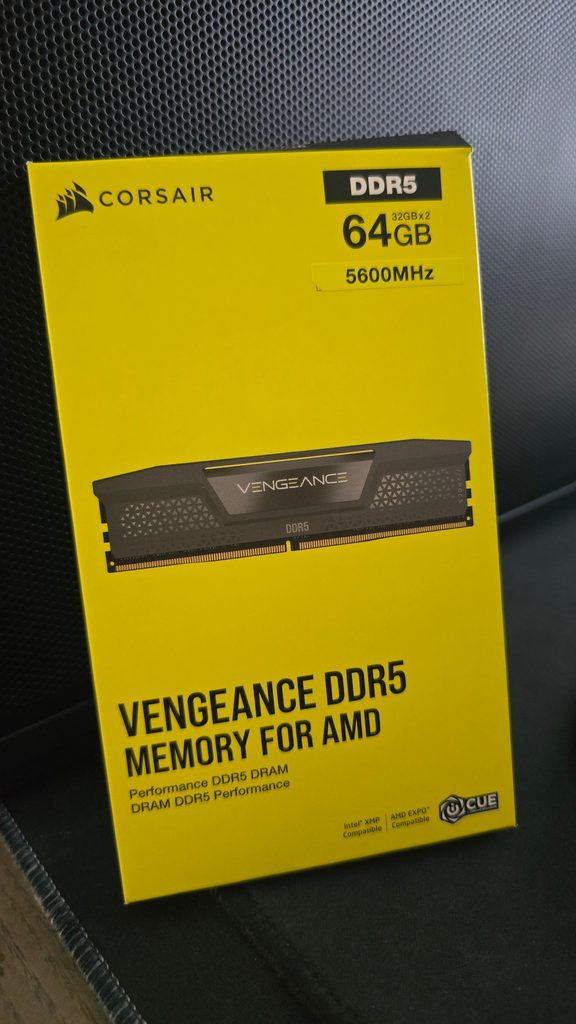
Before tuning, I read the kit’s SPD chip to see what I’d bought. On Linux the DDR5 SPD is readable through the spd5118 driver. It showed Samsung 32Gbit chips, single-rank, with an EXPO profile of 5600 40-44-44-90 at 1.25V. Single-rank 2x32GB is an easy load for the memory controller, so 6000 looked likely.
I set 6000 36-40-40-80 at 1.35V and ran memtest86+. It passed. That’s usually where people stop.
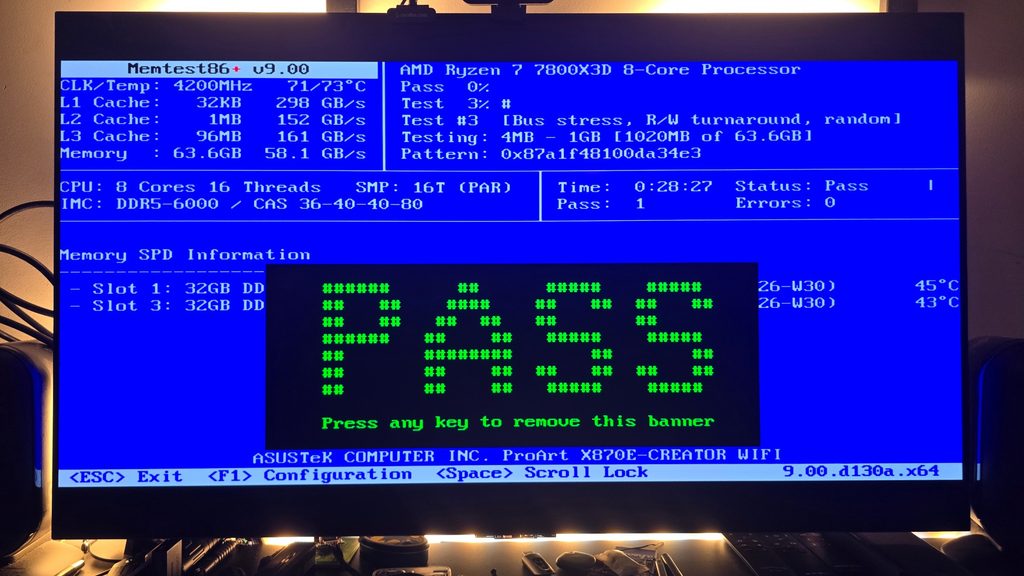
Why a memtest pass wasn’t enough
memtest86+ is good at finding bad memory cells. It’s less good at finding a setup that is only just stable, for three reasons:
- It runs cool. The CPU does relatively little and the GPU sits idle, so the DIMMs and the memory controller stay cooler than they get in real use.
- DDR5 hides small errors. Each DDR5 chip has on-die ECC that quietly corrects single-bit errors and reports nothing. A setting that’s flipping bits can look clean until two errors land in the same word.
- The load is light. Real marginal faults often need every core hammering memory while the voltage swings.
So I ran stressapptest, Google’s stress tool, for an hour: stressapptest -W -s 3600 -M 52000. It keeps every thread copying memory flat out, and every 10 minutes it pauses all threads and restarts them together to cause a power spike. I also logged both DIMM temperatures every 30 seconds from the SPD sensors. The DIMMs went from about 40°C to 50°C in under three minutes, and then sat at 52–56°C.
Chasing the wrong suspect
The first run failed after about 38 minutes:
Hardware Error: miscompare ... read:0x3cffffff3cffffff, reread:0xffffffffffffffff expected:0xffffffffffffffffThe first read came back wrong. A re-read of the same address was fine. My suspect was tRFC, the time each refresh is allowed to take. I’d set it to 600 clocks, which at 6000 MT/s is 200ns. The SPD says these chips need 410ns. Too-short refresh gives exactly this kind of one-off bad read.
So I changed one thing at a time:
| Run | Change | First error |
|---|---|---|
| 1 | tRFC 600 (200ns) | ~38 min |
| 2 | tRFC 900 (300ns) | 18 min |
| 3 | Loose timings (40-44-44-84), tRFC 1230 (spec), SoC 1.25V | 15 min |
| 4 | Same, plus my −20 Curve Optimizer undervolt removed | 9 min |
Every change that should have helped made no difference. The errors came sooner each time. That should have stopped me earlier than it did. When relaxing settings doesn’t help, the settings probably aren’t the problem.
The Curve Optimizer was a reasonable suspect. An undervolted core that’s short on voltage can mis-read data, and stressapptest reports that as a memory error. Run 4 ruled it out.
The run that changed the question
Next I loaded the kit’s own EXPO profile: 5600 at 1.25V, the settings Corsair validated. Nothing hand-tuned, everything else on Auto.
It failed in 7.6 minutes, with the DIMMs at only 50°C:
Hardware Error: miscompare ... read:0xaa45aaaaaa45aaaa, reread:0xaa45aaaaaa45aaaa expected:0xaaaaaaaaaaaaaaaaThis time the re-read was wrong too. In the earlier runs the data in RAM was intact and only the read went wrong. Here the wrong value had actually been stored.
Two details in the errors pointed away from tuning altogether:
- Whole cache lines. Every error covered four to eight consecutive 8-byte words, a whole or half 64-byte cache line, on whichever core happened to read it.
- Substituted bytes, not flipped bits. The bad bytes were whole values that didn’t belong there. The same byte, 0x45, turned up in two different runs, along with its exact inverse, 0xBA.
That looks like data written to or read from the wrong place, a fault in the signals between the CPU and the DIMMs. It doesn’t look like weak memory cells. The kernel logged nothing the whole time: no machine-check events, no EDAC reports.
Controls: same box, then a different box
A failing kit on one machine still leaves two explanations: the kit, or the machine. So I ran controls.
Old kit, same machine. I put the original 2x16GB kit back in, at its hand-tuned 6000 CL36, and ran the same hour of stressapptest. The DIMMs spent 57 of the 60 minutes above 50°C, peaking at 55°C. Result: Status: PASS, 0 errors. Same CPU, board, kernel, load and heat. The machine was fine.
New kit, different machine. Then I took the new kit to elros, a Windows box with a Ryzen 7 7700 on a Gigabyte B650M board, running the latest BIOS. I used a different tool, TestMem5 with the anta777 “Extreme” config, at EXPO. Cycle 1 was clean. It threw an error in cycle 2, an hour and 35 minutes in, with the DIMMs at 52–55°C and the memory voltage steady at 1.23–1.26V. A 2x16GB control kit passed the same test on that machine, both before and after.
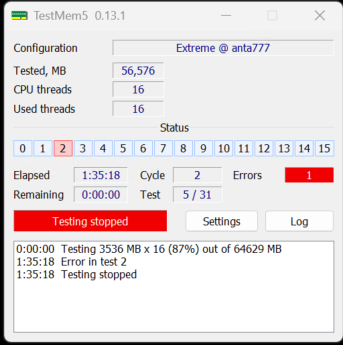
That made it two CPUs, two boards and two test tools. The new kit failed on both machines, and both control kits passed. Verdict: a faulty kit.
To be clear: this is one bad unit. It’s not a verdict on this Corsair model or on Samsung’s 32Gbit chips.
What I’d do differently
Test at stock before tuning. I spent most of an evening tuning a kit that wasn’t stable at its own rating. One warm hour at EXPO, the very first thing, would have shown that straight away.
Treat memtest as a minimum, not a verdict. A pass means the cells are probably fine. It says little about stability under heat and full load. Run something that loads every core, and run it long enough for the DIMMs to heat up.
Log the temperatures. On Linux, the DIMM temperatures are under /sys/class/hwmon/ once the spd5118 driver is loaded. On Windows, HWiNFO shows them. Without them, “it passed” doesn’t say much.
Always run a control. The old kit passing on the same machine was the most useful single result of the whole exercise. It moved the question from “what am I doing wrong” to “what’s wrong with this kit”.
Watch for settings that don’t matter. If loosening every setting doesn’t help, stop tuning and question the hardware.
What’s next
The kit goes back for an exchange while the return window is still open, with the manufacturer’s warranty as the fallback. gilgalad is back on its old 32GB in the meantime. It’s proven stable, and a btrfs scrub of the whole system disk found no corrupted data.
When the replacement arrives, it gets the test this one should have had first: an hour of stressapptest and three cycles of TestMem5 at EXPO, DIMMs above 50°C. Then I tune.