The last manual step
In my last post I replaced a FreeFileSync job I kept forgetting to run with zsync, an rsync script on my Unraid cold box. It runs itself 30 minutes after the box boots, and again every Sunday at 02:00 if it’s still on.
That left one job for me: turning it on. The box, tower, is a cold copy, so it’s meant to be off. Off means ransomware can’t reach it, a slip of the mouse can’t delete from it, and its six disks aren’t spinning for nothing. But “it syncs when I turn it on” still depends on me turning it on.
I didn’t. Tower was off from 1 to 9 November. When I finally booted it, zsync had 84 files and 127 GB to catch up. Nothing was lost, but a whole week of changes had existed in only one place: two NAS units that sync with each other, deletions included.
Leaving it on wasn’t the answer. Apart from undoing the reason it’s cold, tower idles at 35 W. That’s about 307 kWh a year, roughly S$85 at my tariff, to run a backup that takes under an hour a week.
What I already had
It turned out I didn’t need to buy anything:
- A smart plug with a power meter. Tower’s plug is a SmartThings switch, and it reports draw every few seconds into Home Assistant.
- A BIOS that starts the machine when power comes back. Both times I’d switched the plug on recently, tower booted within two minutes. I haven’t checked the setting itself; The first scheduled run confirmed it: tower started about 90 seconds after the plug came on.
- Home Assistant, which can switch the plug on a schedule.
- A heartbeat. A small job on another server sends me a Telegram message when a backup hasn’t reported in on time. I set it up for my other backups, and tower can push to it over SSH with a key that can only stamp its own entry.
The plan: Home Assistant switches tower on at 01:30. Tower boots, waits 30 minutes, syncs, and shuts down. Home Assistant sees it’s off and cuts the plug.
Reading the power meter
The awkward part is the last step. Home Assistant can’t log in to tower to ask whether it has finished shutting down, and I didn’t want to give it a way to. Cutting power to a server that’s still writing is exactly how you corrupt the backup you just made.
The plug’s power meter answers the question anyway. I pulled the history from a shutdown on 1 November:
- Idle, disks spun down: about 35 W
- Syncing: 55–65 W
- Shutting down (the array stops): a spike to about 107 W for a minute
- Halted, plug still on: 0.4–0.9 W
- Plug off: 0 W
Nothing on a running server sits anywhere near half a watt. So the rule is “under 5 W for three minutes means it has halted”. There’s no SSH and no API, only a sensor Home Assistant already had.
The weekly sequence
- 01:30, Home Assistant: switches the plug on and sets a “scheduled backup” flag.
- ~01:32, tower: boots.
- ~02:02, tower: zsync runs and reports to the heartbeat.
- After the sync, tower: the mover runs, then tower powers off.
- Once halted, Home Assistant: draw under 5 W for 3 minutes with the flag set, so it switches the plug off and clears the flag.
- 08:00, Home Assistant: if the flag is still set, raises a notification.
The power-off automation is short:
alias: "Tower backup: power off after shutdown"
triggers:
  - trigger: numeric_state
    entity_id: sensor.nazeem_server_power
    below: 5
    for: "00:03:00"
conditions:
  - condition: state
    entity_id: input_boolean.tower_scheduled_backup
    state: "on"
actions:
  - action: switch.turn_off
    target: { entity_id: switch.nazeem_server }
  - action: input_boolean.turn_off
    target: { entity_id: input_boolean.tower_scheduled_backup }
The flag matters. Without it, any shutdown would cut the plug, including one where I’d shut tower down to swap a disk with the plug left on deliberately.
The power-on automation has one wrinkle. If the plug is already on but tower is halted, switching it “on” does nothing, and the BIOS only boots when power comes back. So in that case Home Assistant switches the plug off, waits 30 seconds, then switches it on. If the plug is on and drawing more than 5 W, tower is already running, and the automation stops there.
The catch I nearly missed
I’d written the shutdown step and was about to move on when I checked where zsync’s files actually end up.
Unraid writes new files for that share to a cache SSD first. A job called the mover copies them onto the parity-protected array every night at 03:40. With tower shutting down straight after the sync, the mover would never run. Every backup would land on an unprotected SSD and stay there.
It wasn’t hypothetical. The 127 GB catch-up run was sitting on the cache when I checked: 119 GB of it.
So on a scheduled boot, tower runs the mover itself after the sync and only powers off once it finishes. The logs record how much is left on the cache.
Telling a scheduled boot from a manual one
If I start tower myself to work on it, it shouldn’t shut down underneath me. Home Assistant knows which boots it started, but tower doesn’t, and I didn’t want tower calling Home Assistant either.
Tower works it out from its own boot time:
boot=$(( $(date +%s) - $(cut -d. -f1 /proc/uptime) ))
hm=$(date -d @$boot +%H%M)
scheduled=0
[ "$(date -d @$boot +%u)" = 7 ] && [ $((10#$hm)) -ge 125 ] && [ $((10#$hm)) -le 155 ] && scheduled=1
A boot between 01:25 and 01:55 on a Sunday is the scheduled one. Any other boot syncs and stays on.
Two more guards:
- The weekly cron job was a trap. A boot at 01:32 plus the 30-minute wait puts zsync at about 02:02. The cron job fires at 02:00, so it would have won the race, and the boot run would have hit zsync’s lock and reported a failure. The cron job now only runs if tower has been up for more than two hours, which covers the case it was meant for: tower already on.
- No poweroff during a parity check. If Unraid is checking or rebuilding parity, tower stays on and says so.
What about a failed sync? Tower still powers off. A cold box left running is the worse failure, and the heartbeat reports the problem either way.
Hearing about failures
Every run, scheduled or manual, pushes ok or fail to the heartbeat. If there’s no successful run within seven and a half days, I get a Telegram message. That covers a sync that failed, a plug that never switched on, and a BIOS that didn’t boot: all of them end in silence, and silence is what the heartbeat checks for.
The 08:00 check covers the opposite failure: tower switched on and never shut down. It raises a notification and leaves tower alone. Cutting power on a guess is the one thing this setup must never do.
Adding tower’s key to the heartbeat server took two tries. The first command failed with Directory nonexistent: the heartbeat user’s home directory wasn’t where I assumed. A test push afterwards came back stamped tower-zsync ok.
First run
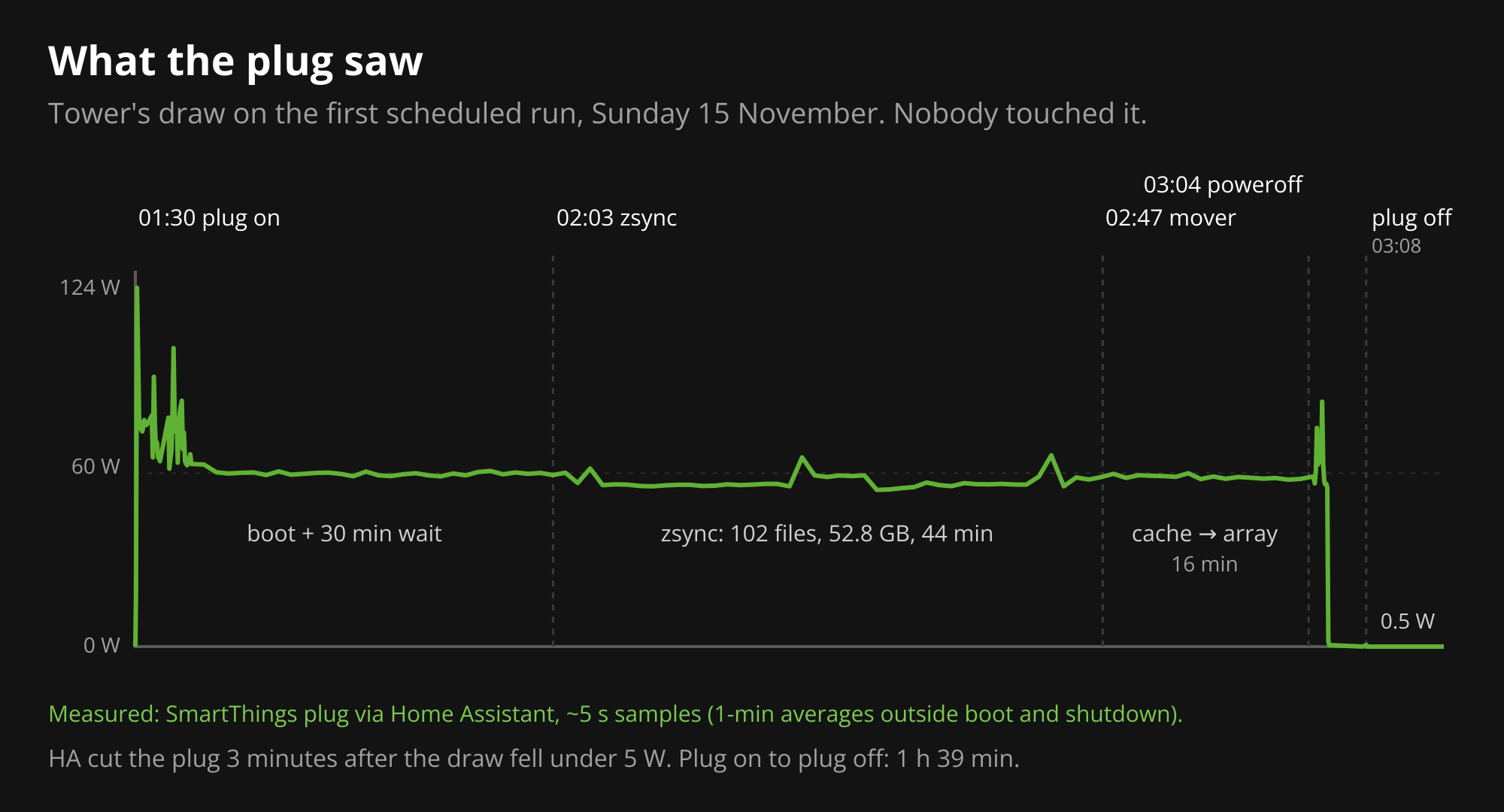
It worked first time. This is Sunday 15 November, from tower’s logs and the plug:
- 01:30:02: Home Assistant switches the plug on.
- 01:31:36: tower’s kernel starts. The BIOS boots on power restore, about 90 seconds after the plug.
- 02:03:31: zsync starts after the 30-minute wait.
- 02:47:38: zsync finishes and pushes ok to the heartbeat. 102 new files, 52.8 GB, in 44 minutes. Most of it was TV and one 4K film. 27 files that changed on the NAS, mostly in Documents, had their old versions set aside rather than overwritten: 12 MB.
- 03:04:09: the mover finishes moving all 102 files from the cache to the array, in 16 minutes. Nothing is left on the cache. Tower powers off.
- 03:05:44: the plug reads 0.5 W.
- 03:08:46: Home Assistant switches the plug off and clears the flag.
Plug on to plug off took 1 hour 39 minutes. At just under 60 W, that’s about 0.1 kWh for the week, against nearly 6 kWh if tower sat idle all week.
Draw during the wait sat near 60 W rather than the 35 W idle figure, probably because the disks hadn’t reached their 30-minute spin-down yet. It doesn’t change anything: the rule only cares about the drop to under 5 W.
The step I was most nervous about was the last one. A few days before, tower had hung once at the very end of a manual shutdown: array stopped cleanly, but the box sat at 35 W until I cut the power myself. If that happens on a Sunday, the plug never sees under 5 W, so nothing gets cut and the 08:00 check flags it. That’s the design working, but it’s not the outcome I want. This time it went from poweroff to halted in about 95 seconds. I’m still tracing the hang, and one clean run doesn’t clear it.
What I’d tell someone doing the same
- A power meter is a shutdown sensor. Halted and running are two orders of magnitude apart. You don’t need to log in to know.
- Check where your writes land. A cache in front of the array is invisible until you shut down before the mover runs.
- Look for races with your old schedule. My own cron job would have broken the new setup on its first night.
- Never cut power on a guess. Only cut power once the plug has confirmed the server has halted; otherwise, alert and wait.
- Monitor for silence, not just errors. Most ways this can fail never produce an error at all.