Between the 2024 network upgrade post and the Homelab 1.0 post, I’ve talked a lot about individual components — the 10G switches, the Proxmox cluster, the NAS stack. But I’ve never actually drawn the full picture of how everything connects. Partly because it was always evolving, and partly because I suspect I was slightly embarrassed about how complicated it had gotten.
Well, here it is.
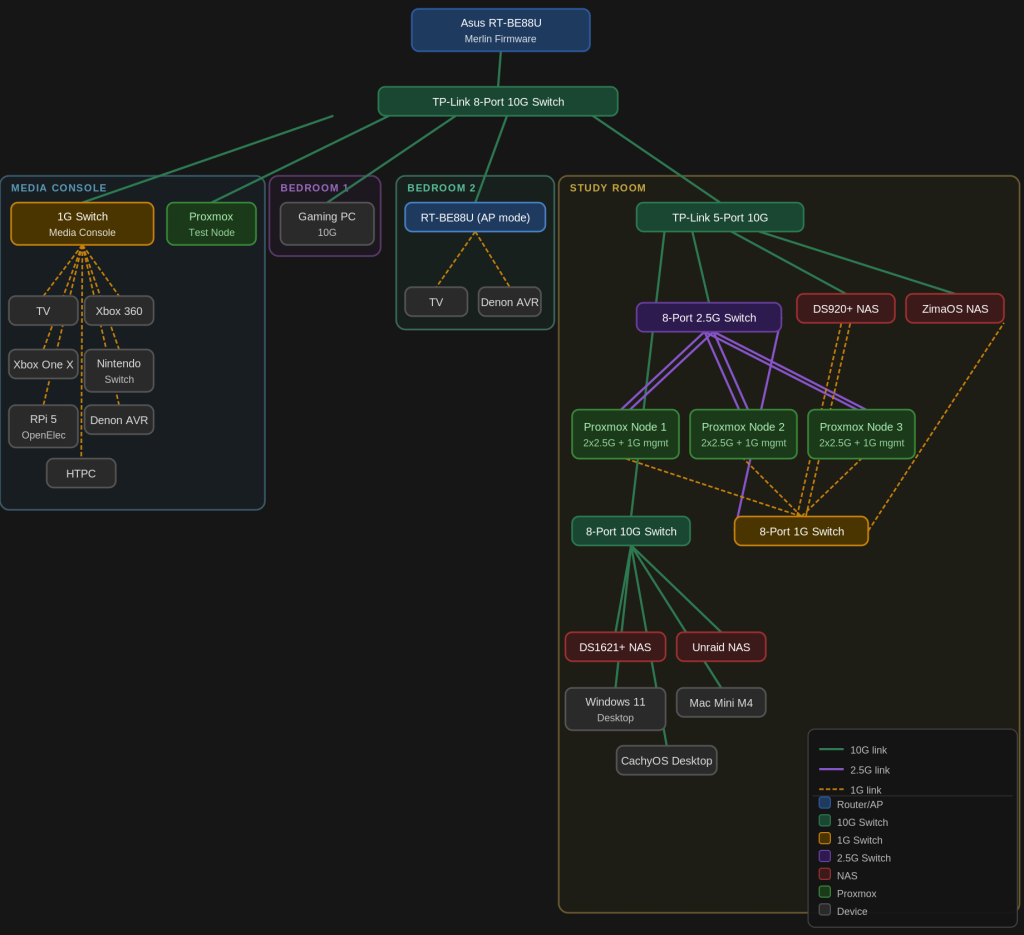
Fair warning: it’s a lot.
The Spine
Everything in the house hangs off two devices: an Asus RT-BE88U running Merlin firmware as the main router, and a TP-Link TL-SX1008 8-port 10G switch that acts as the core distribution layer. The router connects to the switch via one of its 10G ports, and from the switch, a single 10G run goes to each room. This is the backbone that all four zones of the house branch off from.
A quick correction from my 2024 post, where I said the house was running Cat 5E — that was wrong. It’s actually Cat 6 throughout. Apologies for the confusion. Cat 6 is rated for 10G up to 55 metres, so the 10G speeds across the house make complete sense, and I can stop sounding like I’m living dangerously.
Media Console
The media console area is the most “legacy” part of the network. It uses a 1G switch to service the TV, Xbox 360, Xbox One X, Nintendo Switch, Raspberry Pi 5 (running OpenElec), Denon AVR, and the HTPC. None of these devices need more than gigabit, so there’s no point in running 10G cabling to each of them. The 1G switch itself connects back to the main 10G switch, so aggregate throughput is fine.
The one exception in this zone is the Proxmox test node, which gets a direct 10G connection from the main switch. I use this node to experiment with new configs before rolling anything out to the main cluster in the study room — having it on full-speed connectivity matters when I’m moving VM images around.
Bedrooms
Bedroom 1 is simple: a direct 10G connection straight to the gaming PC. No middlemen.
Bedroom 2 has a second RT-BE88U running in AP mode, which provides Wi-Fi coverage to that end of the house. It also has the TV and Denon AVR wired into it directly. I previously ran a GT-AX11000 Pro in this role, but after the primary router upgrade, having two RT-BE88U units running Merlin in AiMesh mode has made the whole setup much more coherent.
One thing I’m looking forward to exploring with the RT-BE88U is Guest Network Pro, which allows each wireless SSID to be assigned to its own VLAN. This means I could eventually segment the IoT and media devices in this zone — the TV, the Denon — onto their own isolated network, completely separate from the rest of the house. It’s the kind of proper network segmentation I’ve been putting off, and having hardware that natively supports it on both the primary router and the AP removes the main excuse I had for not doing it.
Study Room: Where It Gets Complicated
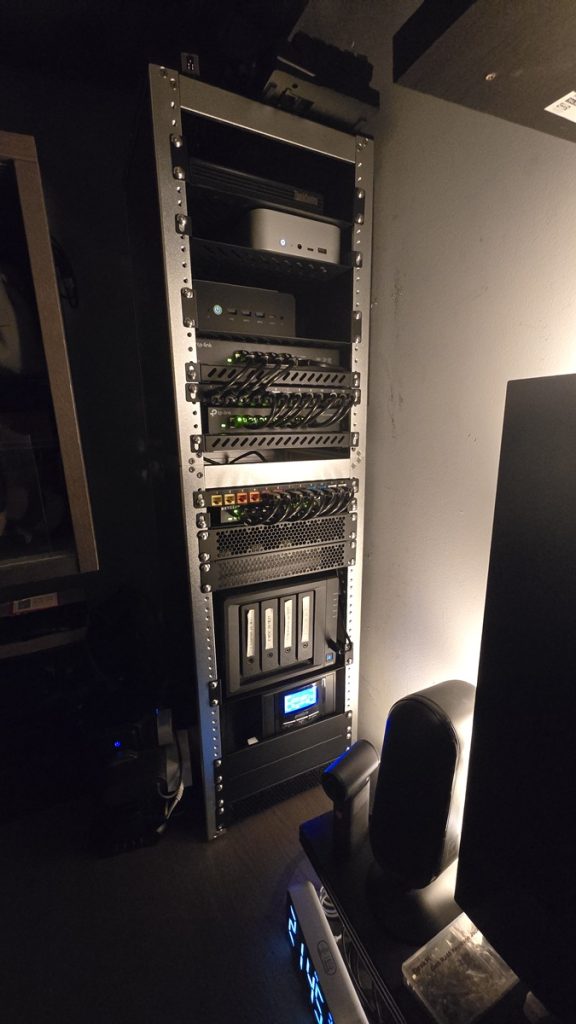
This is where most of my infrastructure lives, and the network reflects that.
A TP-Link 5-port 10G switch sits at the top of the study room hierarchy, connected back to the main 10G switch. From there, things fan out:
- DS920+ NAS and ZimaOS NAS each get a direct 10G connection from the 5-port switch. These are the primary working NAS devices, and they need fast access to the rest of the network.
- An 8-port 10G switch provides 10G connections to the workstations: DS1621+ NAS, Unraid NAS, Windows 11 desktop, Mac Mini M4, and CachyOS desktop. Everything in this group transfers data at full 10G speeds, which makes a real difference when shuffling large files to and from the NAS.
The interesting bit is the Proxmox cluster networking, which has two separate paths:
The 8-port 2.5G switch handles the data network. Each of the three Proxmox nodes connects with two bonded 2.5G ports — so each node has an effective 5G data link for VM traffic and storage replication.
The 8-port 1G switch handles the management network. Each Proxmox node has a dedicated 1G management interface, completely separate from the data path. The DS920+ gets two bonded 1G ports through this switch (for its management/backup traffic), and the ZimaOS NAS also has a 1G management link here. Keeping management traffic off the data network is something I should have done from the start — it makes the cluster much more stable and gives me a reliable out-of-band path when something inevitably breaks.
What’s Next
The topology is largely stable at this point, but there are a few things I’m considering:
The 8-port 1G switch has a few spare ports that I’d eventually like to use for dedicated IPMI/iDRAC-style out-of-band management on the NAS devices — the Synology units support this to a degree, but I haven’t gotten around to configuring it properly.
And with Cat 6 confirmed throughout the house, at least I can stop worrying about the cabling holding back my 10G links — that particular anxiety has been retired.
If you’ve made it this far, congratulations — you now know more about my home network than most people probably want to. The diagram is linked above if you want to zoom in on any particular section.