systemctl is-active said active. The daemon had never once logged in.
I went to look at a UPS status page expecting to be bored. The server it protects sits on an 850 VA unit over USB, the monitoring daemon has been running for as long as the machine has, and the whole thing had never asked me for anything.
I started with a small, boring problem: the password in the config was secret. It is the example straight out of the documentation, it was in a world-readable file, and I was going to spend ten minutes rotating it.
That turned out to be the least of it.
The monitoring daemon had never successfully authenticated, and there was no shutdown command configured at all. The UPS would carry the server through a short blip, and then on a real outage the battery would run down and the machine would die hard, with nothing anywhere orchestrating a clean shutdown.
The UPS was working. It was a battery. It had never been a shutdown controller.
The chain, and where it broke
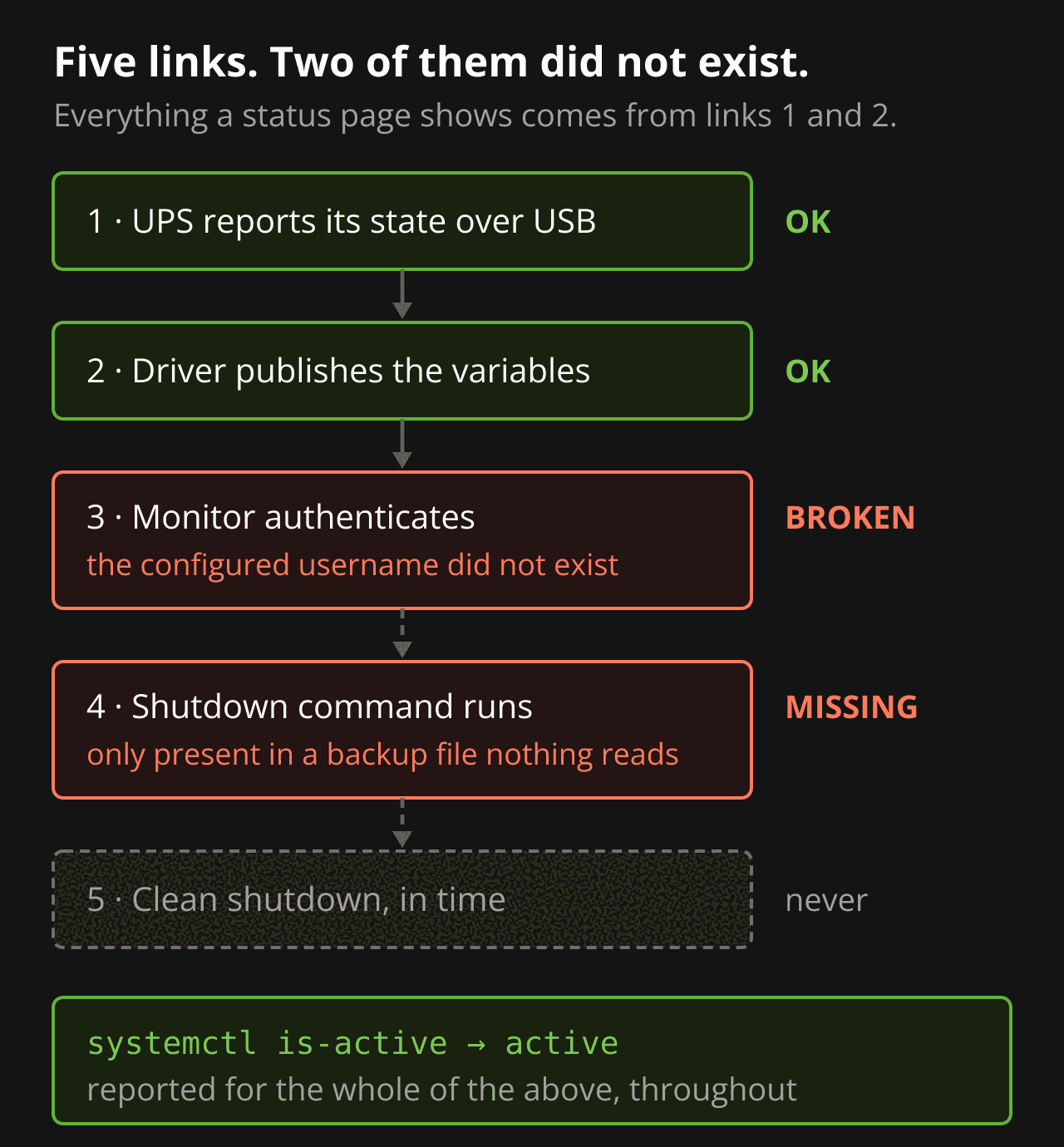
A UPS shutdown is not one thing. It is a chain, and every link has to hold:
- The UPS reports its state over USB.
- The driver translates that into variables a server can read.
- The monitoring daemon authenticates to that server.
- On a low battery, it runs a shutdown command.
- The machine goes down cleanly before the battery does.
Links 1 and 2 were fine throughout. Status on line, battery 100%, sensible input and output voltages. Everything a status page shows was correct, which is precisely why the status page had never worried me.
Links 3 and 4 did not exist.
Three defects, each sufficient on its own
1. The username in the config didn’t exist. The monitor line named a user called admin. The users file defined two accounts, and neither of them was admin. Every single start logged an access-denied error and then carried on running.
Login on UPS [ups@localhost] failed - got [ERR ACCESS-DENIED]2. There was no shutdown command. The live config held exactly two directives: which user to run as, and which UPS to monitor. That is it.
Every shutdown command on the filesystem lived in /etc/nut/backup/upsmon.conf — a backup copy the daemon never reads.
This is the one I want to underline. If you grep the filesystem for the directive, you get hits. Several of them, in a file whose path looks reassuringly official. It is very easy to search, see matches, and conclude the thing is configured. I would have.
3. The users file was malformed. The account block used the wrong keyword for granting monitor privileges, so even a correct username would not have got a working session.
And the password file was world-readable, which the server logs a warning about on every start, containing the documentation’s own example password.
The failure was silent in the way that matters.
systemctl is-activereturnedactivethe entire time. The daemon starts happily, fails to log in, and keeps running. Service state tells you nothing here. Only the log does.
What it was protecting against was already written down
The uncomfortable part: the risk this was meant to mitigate was sitting in my own notes, from three weeks earlier, about the backup drive attached to that same server.
USB bridges frequently misreport write barriers, so an unclean power cut mid-sync is the most realistic corruption path for the filesystem on that enclosure.
I had identified the top risk correctly, named the mitigation, and never checked that the mitigation was wired up. The analysis was fine. The verification never happened.
Testing a shutdown chain without shutting anything down
Once fixed — new generated password, correct username, a real shutdown command, tightened file permissions — it has to be tested. And the obvious test is the one you must not run first.
Don’t test a shutdown chain with the real shutdown command. Point the shutdown command at a benign logging call, trigger the chain, and confirm each link fired. Then, and only then, put the real command back.
Signal 10: User requested FSD
Executing automatic power-fail shutdown
Client upsadmin@127.0.0.1 set FSD on UPS       <- authentication working
Auto logout and shutdown proceeding
upsmon-TEST: FSD-FIRED-would-have-shut-down    <- the command ran
Three things verified in one pass: the daemon authenticated, the forced-shutdown state propagated, and the configured command actually executed. The machine stayed up.
The test leaves residue, and this is the trap. Firing it creates a power-down flag file and sets the forced-shutdown state on the UPS itself. Leave that flag in place and it tells the UPS to cut its own output during the next ordinary shutdown — so a routine reboot turns into a dark machine. Remove the flag, restart both services, and confirm the UPS status has gone back to plain on-line before you walk away.
The reading that looked like a disaster and wasn’t
With the chain fixed, one number still looked wrong. The reported load was zero.
That is a serious reading if it is true. Zero load means the server isn’t drawing from the UPS at all, which would mean it sits on a surge-only outlet, which would mean none of the work above mattered — there would be no runtime to shut down within.
I planned a set of tests to resolve it. The proof was already in the journal:
10:27:20  UPS on battery
10:27:50  UPS on line power
Same process ID on both sides of the outage. The server logged continuously straight through a real mains pull. A machine that lost power gets a new process ID and a boot sequence, and there is neither. A surge-only outlet passes mains through untouched, so no mains means no output. It could only have survived those thirty seconds on battery.
The load figure is simply wrong. Measured draw at the plug is 20.8 W, about 4% of the unit’s real-power capacity, and the driver truncates a single-digit percentage to zero. The sensor is useless at this load and nothing is actually broken. Same family of omission as the driver’s missing runtime estimate.
Worth noting what couldn’t have settled it: a smart plug’s power reading. It measures throughput, not source. A surge-only outlet passes 20.8 W just as happily as a battery-backed one does. Only the survival evidence discriminates, and it was free.
The alert that didn’t fire, and shouldn’t have
A status page you have to remember to open is not monitoring. So the UPS now feeds a home automation server that pushes to my phone on mains loss, low battery and recovery.
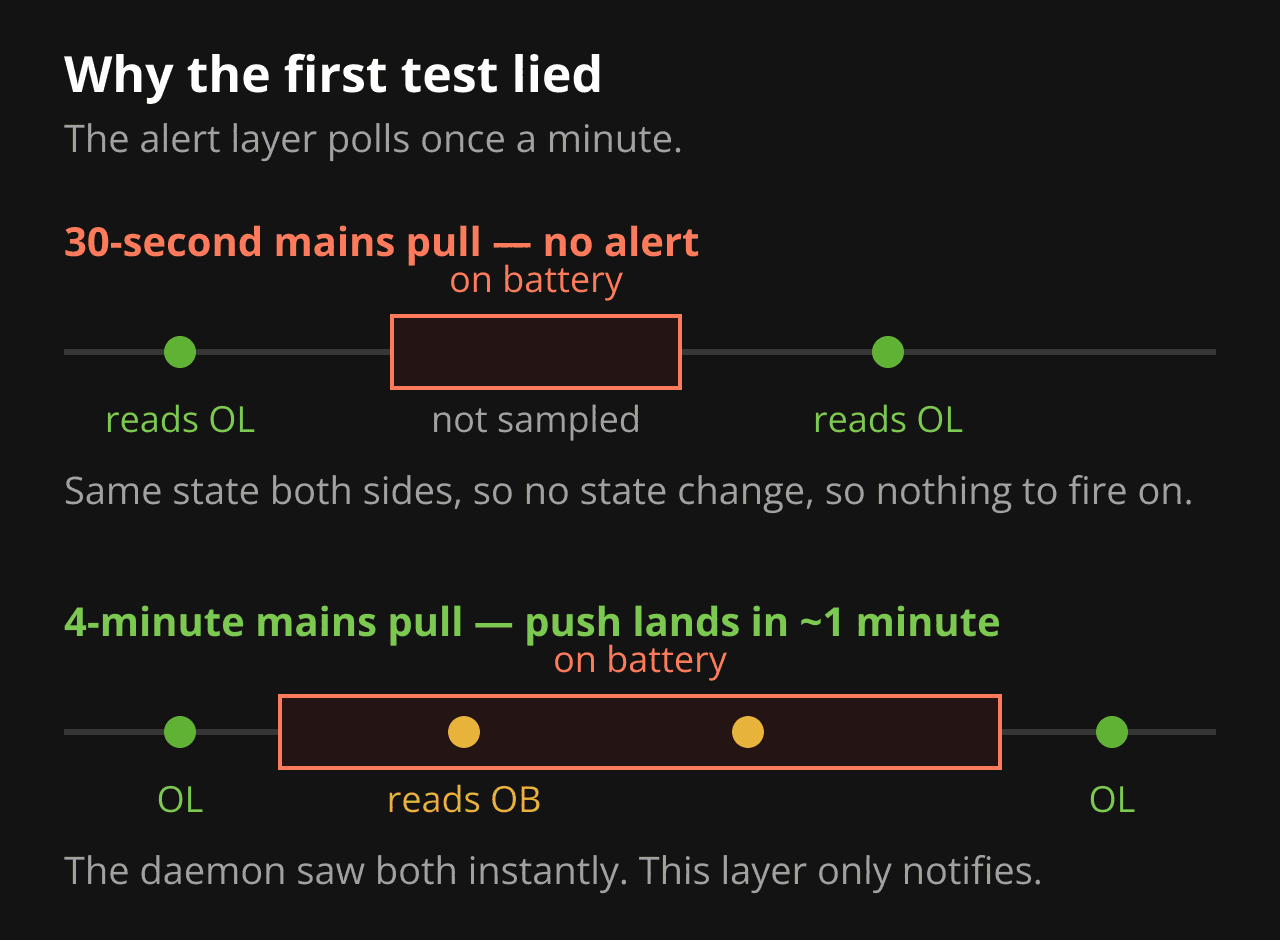
The first live test failed. I pulled the mains for thirty seconds and no notification arrived.
Nothing was broken. That integration polls on a 60-second interval — it is not event-driven. The outage started and ended between two samples, so it read on-line both times and there was no state change to trigger on. A longer pull the same day alerted correctly, with the push landing about a minute after mains loss: exactly the poll interval, behaving as designed.
Two things came out of that. Test outages for three to five minutes, not thirty seconds. And keep the responsibilities straight in your head:
- The monitoring daemon on the server is the protection. It is event-driven and reacts in real time.
- The push notification is a notification layer on a one-minute poll.
A missed alert does not mean the machine is unprotected. When the alerting looks broken, read the daemon’s log first — it is the authoritative record of what the UPS actually did.
What I’d tell someone
systemctl is-active is not evidence. A daemon can run for a year while being unable to do the one thing it exists for. Read the log it writes at startup, not the state systemd reports.
Grep hits are not configuration. Check the file the service actually loads. Backup copies, disabled examples and documentation snippets all match a search just as well as live config does.
Test the chain, not the components. Each of the three defects here would have been individually invisible to a check of the layer above or below it.
Verify the mitigation, not just the risk assessment. I had written down the exact failure mode this protects against, and the note was right, and nothing in it was connected to anything.
And if you have more than one UPS, go and check the one guarding the machine you actually care about. This was the test server. Its config had drifted on its own and quietly disagreed with every other box in the house — which is the kind of thing you only find by looking at each one, since none of them will tell you.