A very good mobile 5G router will not save you from a spectrum-poor carrier. I tested two different SIMs and the results were surprising .
I bought a TP-Link M8550 to give myself a working internet connection at a desk where the wired option isn’t mine to control. It’s a battery-powered 5G hotspot with Wi-Fi 6E, a touchscreen, a gigabit Ethernet port and a S$455 price tag.
This review is in three parts: why I bought it, what the device actually is, and what happened when I put a SIMBA SIM and an M1 SIM through the same test at the same desk. The third part is the interesting one, because the result inverts the national speed rankings and the router had nothing to do with it.
Why I bought one
My use case is unglamorous. I need a reliable, private connection at a desk in an office building where the wired network isn’t mine to configure, and where the guest Wi-Fi is a shared resource with someone else’s policy attached to it. I wanted my own uplink — one where I control the DNS, the VPN and the routing, and where nothing I do competes with a building full of other people.
A phone hotspot does this badly. It drains the phone, it re-tethers every time the screen locks, and it gives you no Ethernet port and no admin interface. What I wanted was a proper router that happens to have a SIM in it. It will also come in handy when I travel around the region.
That context defines which specifications I care about. Battery life is nice but not the point — this thing sits on a desk plugged into USB-C most of the day. What I actually needed was:
- A real admin interface, not a phone app, so I can see what the radio is doing
- A gigabit Ethernet port, for when I want to hang something wired off it
- Wi-Fi 6 or better, so the wireless leg never becomes the bottleneck
- Band flexibility, because I didn’t know which carrier I’d settle on
The M8550 does all four. Whether the network holds up its end is the subject of part three.
The device
What you get
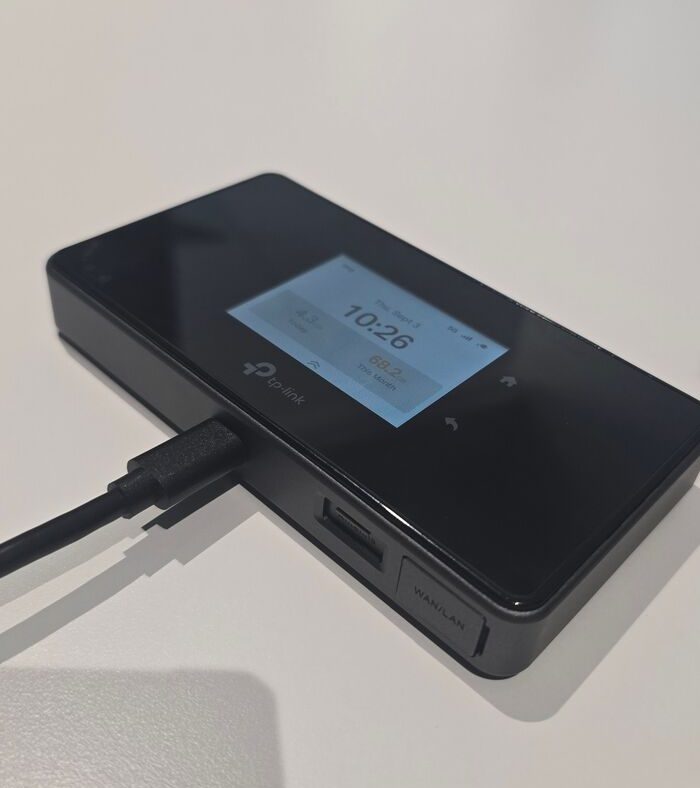
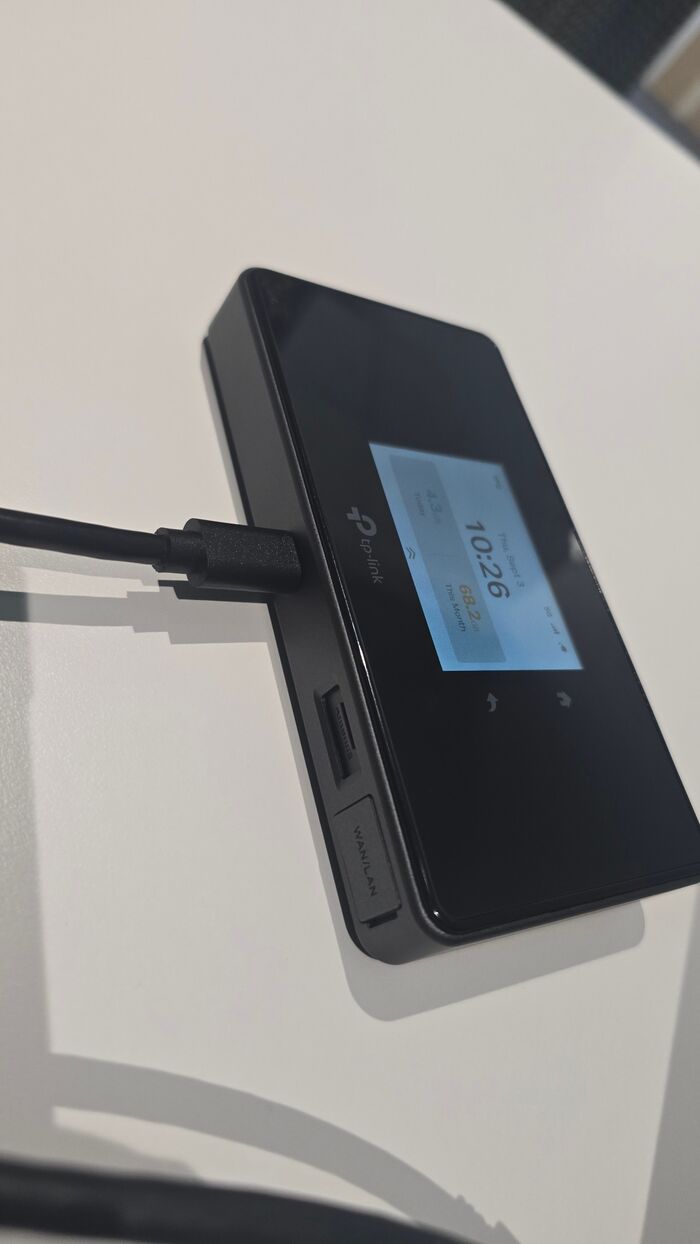
The M8550 is a 135 × 73.7 × 20.5 mm slab with a matte plastic back and a glass front, about the footprint of a chunky phone. A 2.4-inch TFT touchscreen sits on the face, showing clock, data used today, data used this month, signal bars and connection type. It’s genuinely useful at a glance and I’ve never needed to dig into its menus.
Around the edges: one gigabit WAN/LAN port, USB-C for charging and data, a nano-SIM slot, a microSD slot taking up to 2 TB, and — importantly — two TS-9 external antenna connectors.
The battery is 4680 mAh, rated for around 14 hours. TP-Link’s page says 4700 mAh and 15 hours; the datasheet says 4680 and 14. Marketing rounding, not a scandal, but worth knowing which number to trust.
The specs that matter, and the one that doesn’t
The headline is 3.4 Gbps down, 900 Mbps up. Treat that the way you’d treat a car’s top speed on a closed track. It requires spectrum no local carrier will hand a single device.
More useful numbers:
| Wi-Fi | Tri-band, 688 Mbps @ 2.4 GHz, 2880 Mbps @ 5 GHz or 6 GHz |
| Clients | Up to 32 |
| Ports | 1 GbE WAN/LAN, USB-C, 2 × TS-9, nano SIM, microSD to 2 TB |
| Battery | 4680 mAh, ~14 h |
| Power | 12V/1.5A, 9V/2A, 5V/3A |
| Operating temp | 0–35 °C |
Two of those deserve a flag.
“Tri-band” is selectable, not simultaneous. The datasheet is precise about this if you read it closely: it supports enabling 2.4 GHz or 5 GHz or 6 GHz. You choose. You do not get all three at once. In the admin interface the 6 GHz radio shows greyed out while 5 GHz is active, which is the UI telling you the truth. Nothing wrong with it, but “Tri-Band AXE3600” on the box implies something the hardware doesn’t do.
Operating temperature tops out at 35 °C. In the tropics, that’s not a theoretical limit. Ambient outdoors runs 31–33 °C routinely, and a car dashboard or a sunny windowsill blows straight past 35. Reviewers elsewhere noted the unit warms under sustained load and throttles slightly. Mine has been fine on an air-conditioned desk, which is the only environment I can honestly speak to.
Buy the right regional variant
This is the practical trap and it’s worth more than any benchmark in this review.
The band list varies by region, and the US variant supports N2/N5/N12/N14/N25/N29/N30/N41/N48/N66/N71/N77. There is no n1 and no n3 in that list.
My local carriers run 5G on n1 (2100 MHz) and n78 (3500 MHz). SIMBA’s entire 5G network is n1. So a US-market M8550 — the one that looks like a bargain on eBay — would get you zero 5G on SIMBA and a compromised experience elsewhere. The EU/APAC variant carries n1/n3/n5/n7/n8/n20/n28/n38/n40/n41/n77/n78 and is the one you want.
Check the band list against your carrier before you buy, not after.
The admin interface
You reach it at 192.168.1.1. It’s the standard modern TP-Link web UI — clean, fast, no CLI, no SSH, and it will not embarrass you.
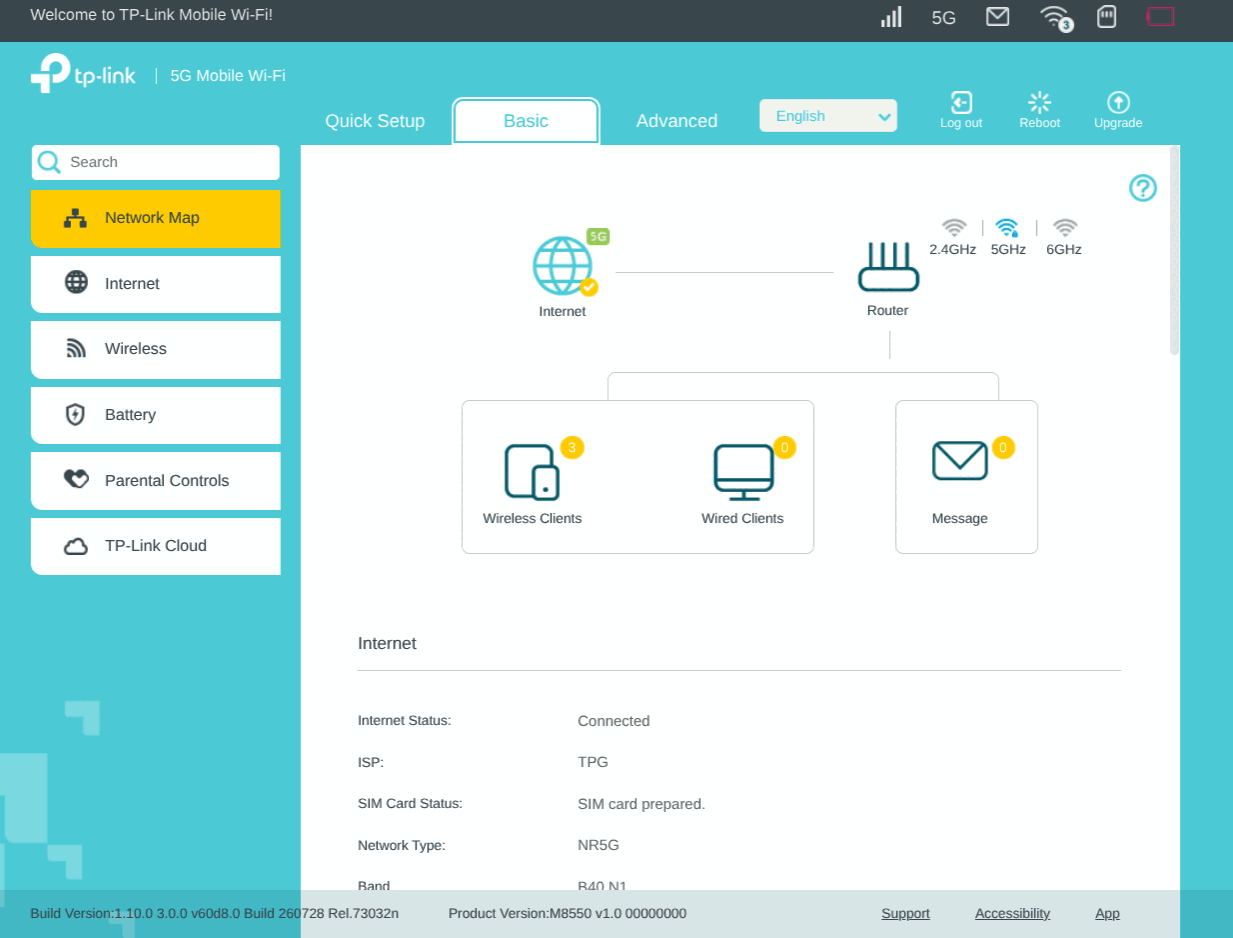
The Basic tab gives you a network map with the essentials on one screen: internet status, ISP, SIM status, network type and — the part I ended up living in — the active bands. Down the left: Network Map, Internet, Wireless, Battery, Parental Controls, TP-Link Cloud.
The Advanced tab is where the actual router comes alive:
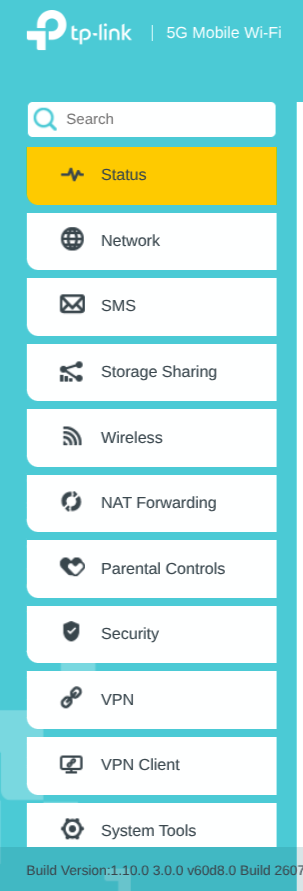
Status, Network, SMS, Storage Sharing, Wireless, NAT Forwarding, Parental Controls, Security, VPN, VPN Client, System Tools. Both a VPN server and a VPN client, with WireGuard support, on a battery-powered hotspot — that’s a genuinely strong feature set at this price. SMS reading and Storage Sharing off the microSD are nice extras.
The Status page is the best thing about this device, and it’s the reason the rest of this review exists. It exposes the full radio picture: band, ARFCN, PCI, channel bandwidth, RSRP, RSRQ, SINR, modulation, MCS, rank indicator, cell ID and TAC — for the NR carrier and the LTE anchor separately. Most consumer CPE hides all of this. Without it I’d have drawn exactly the wrong conclusion from my speed tests, as you’ll see.
The web UI can do both plain HTTP and HTTPS, which has to be toggled on in the Systemt Tools –> Administration tab However, there is no unauthenticated API — every endpoint returns HTTP 406 without a session, so you cannot scrape signal metrics into a monitoring system without doing login automation. For a device this instrumented, that’s a shame.
Performance, and the SIM that changed the answer
The test
Everything below was measured at the same desk, with the laptop 50 cm from the router, using the same script: three single-stream 50 MB downloads, six parallel 25 MB downloads, three 20 MB uploads, and ping to 1.1.1.1 both idle and under four concurrent downloads to measure bufferbloat.
I use this device at my desk with the battery out – so it runs purely on USB-C. This will prevent battery saving mode, and give overall better performance. The device does get warm to the touch though.
First, the Wi-Fi leg, so we can dismiss it. It pinned at 1200.9 Mbps (Wi-Fi 6, 80 MHz, 2×2, HE-MCS 11) at −41 to −46 dBm in every single test. That’s the ceiling for a 2×2 client on 80 MHz. Roughly 50 dB of signal headroom. The Wi-Fi side of this router was never remotely the constraint, and nothing that follows is its fault.
One trap worth recording: at idle the Wi-Fi TX rate reads about 65 Mbps. That’s rate-control backing off, not a fault. It snaps to 1200.9 Mbps the instant traffic flows.
Six network modes, and what they do
The Network Mode dropdown offers six options, and they are not cosmetic:
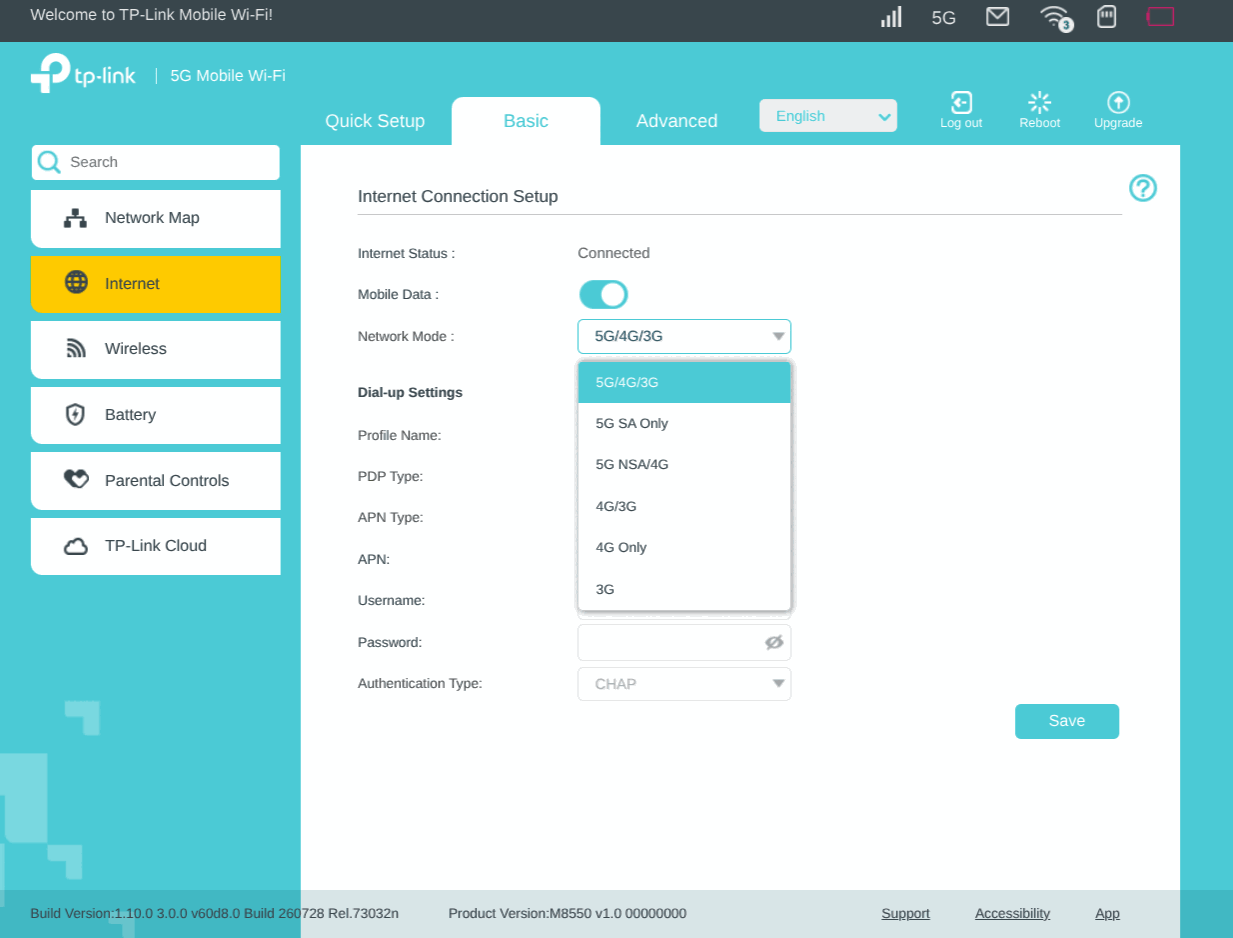
Worth noting the 3G entries are dead weight in Singapore — M1 retired 3G on 1 August 2024, Singtel and StarHub by November 2024.
I tested five combinations of SIM and mode.
The results
| SIMBA auto | SIMBA SA Only | M1 4G | M1 SA Only | M1 auto | |
|---|---|---|---|---|---|
| Download, single | 106.9 | — | 30.5 | 39.4 | 32.5 |
| Download, parallel | 105.4 | would not connect | — | 41.5 | 27.7 |
| Upload | 14.9 | — | — | 3.8 | 26.7 |
| Latency, idle | 18.6 ms | — | 33.1 | 27.7 | 33.4 |
| Latency, loaded | 46.6 / 120 peak | — | — | 71.5 / 107 | 86.3 / 106 |
All figures Mbps. SIMBA auto was run twice, hours apart, at 96 and 107 Mbps.
SIMBA beat M1 by 2.6×.
That should be startling. Opensignal’s July 2026 Singapore report, covering 1 April to 29 June, puts M1 at 305.5 Mbps average 5G download and SIMBA at 39.0 Mbps. M1 is nearly eight times faster nationally. At my desk the ranking reverses completely.
Why — and this is where the Status page earned its keep
The M8550’s radio telemetry, on the SIMBA SIM:
| NR leg | LTE anchor | |
|---|---|---|
| Band | n1 @ 2114 MHz (FDD) | B40 @ 2310 MHz (TDD) |
| Downlink bandwidth | 10 MHz | 20 MHz |
| RSRP | −87 dBm | −92 dBm |
| SINR / SNR | 28 dB | 18 dB |
| Rank | 2 | 1 |
Both legs live simultaneously means this is EN-DC — 5G NSA, an LTE anchor with an NR carrier aggregated on top. Not standalone 5G, which is why 5G SA Only refused to connect at all on SIMBA despite them holding an n1 SA licence.
Now the arithmetic. 10 MHz of n1 plus 20 MHz of B40 is about 30 MHz of downlink spectrum, total. Run the numbers for 10 MHz FDD at rank 2 plus 20 MHz TDD at rank 1 and you land around 100–145 Mbps. I measured 107.
That 107 Mbps is the ceiling of the spectrum, not a fault in the setup. And look at the SINR: 28 dB is near the top of the scale. The radio link is excellent. There is no signal problem to fix. I spent an embarrassing amount of time planning to move the router to a window before the telemetry told me that signal was never the constraint — more signal converts to exactly zero extra throughput when you’re bandwidth-limited.
M1’s problem is the mirror image. Their capacity sits on n78 at 3.5 GHz, roughly 100 MHz wide — three times SIMBA’s spectrum — and 3.5 GHz does not penetrate a building. The proof isn’t my inference: on 5G/4G/3G, M1’s own modem picks LTE over its own n78 5G cell. The network’s ranking agrees with mine.
M1’s 5G SA Only result gives the game away too — 39.4 down against 3.8 up, a 10:1 ratio. That’s the fingerprint of a TDD band, where uplink gets only about a fifth of the frame. SIMBA’s n1 is FDD, which is why its upload is nearly four times better.
Indoors, the band that penetrates beats the band that’s wider.
Verdict
The M8550 is a very good device that I cannot fault for my results. It supports every band Singapore uses, its Wi-Fi never came within 10× of being the bottleneck, its VPN client and server are unusual at this price, and its Status page exposes radio telemetry that most consumer CPE hides. At S$455 it’s expensive for a hotspot and fairly priced for what is really a portable router with a modem in it.
Buy it if you want a self-contained uplink you actually control, with an Ethernet port, real VPN support and diagnostics you can reason about.
Don’t buy it expecting the number on the box. 3.4 Gbps needs spectrum no Singapore carrier will give one device.
Three things I’d tell a buyer here:
- Check the regional variant. The US model has no n1 and no n3. On SIMBA it would get no 5G at all.
- The tri-band is selectable, not simultaneous — 2.4 or 5 or 6, not all three.
- 35 °C operating limit is a real constraint in this climate. Air-conditioned desks are fine; car dashboards are not.
And the finding that outlived the review: national 5G averages are close to useless as indoor predictions. M1 averages eight times SIMBA nationally and lost to it by 2.6× at my desk, because band matters more than carrier once you’re behind a wall (or multiple walls). If you’re choosing a SIM for a fixed indoor spot, the only number worth having is the one you measure yourself — and this is a device that will tell you exactly why you got it.