This started as a small question. I was reading about WebRTC leaks — the trick where a browser, asked politely by a webpage, will happily enumerate every IP address on every interface it can see and hand them over, VPN or no VPN. I was scoffing at the idea that I had any exposure, but just to answer my curiosity, I ran hide.me‘s own leak test to see what my browser was giving away.
The browser was a solvable problem. Three Firefox prefs and it stops volunteering host candidates. But while I had the test page open, I noticed something in the results that had nothing to do with WebRTC, and I spent the next two days on it instead. It took a few reboots and reconfiguration in 3 different places. Thankfully, there was no downtime during peak K-drama timings!
The measurement
My VPN runs on the router, not on each device. That was a deliberate choice years ago: one client, one config, and every device in the house is covered whether or not it’s capable of running a VPN client itself. The router had an OpenVPN client up, connected to hide.me’s local endpoint, in policy-routing mode so I could pick which devices used it. I had checked it. It worked. I hadn’t thought about it since.
Then I asked the two stacks separately.
| Stack | Address seen by the far end | Whose is it? |
|---|---|---|
| IPv4 | xxx.xxx.xx.xx | The hide.me exit. Correct — this is what I expected. |
| IPv6 | xxxx:xxxx:xxxx:xxxx:xxxx:xxxx:xxxx:xxxx | My actual ISP. Not tunnelled. Not NATed. Not translated. |
A bare curl ifconfig.me had been telling me the truth for months, and I had never read it properly, because a bare curl prefers IPv6 and I had been reading the answer as “my IP” rather than “my IPv6”. The moment I forced each stack separately, the split was obvious.
The IPv6 address that reached the remote server was byte-for-byte the SLAAC address on my desktop’s network interface. That is worse than it sounds. A leaked IPv4 address exposes a household behind NAT. A leaked SLAAC address exposes this interface on this machine, it’s stable over time, and it therefore works as a perfectly good cross-site device identifier. My desktop has three of them (2 LAN + 1 Wifi).
Every device in the house was half-protected, and the half that was leaking was what identified the device.
It wasn’t broken. It was never built.
My first assumption was a misconfiguration — a rule I’d fat-fingered, or a VPN provider not handing out IPv6. Both wrong.
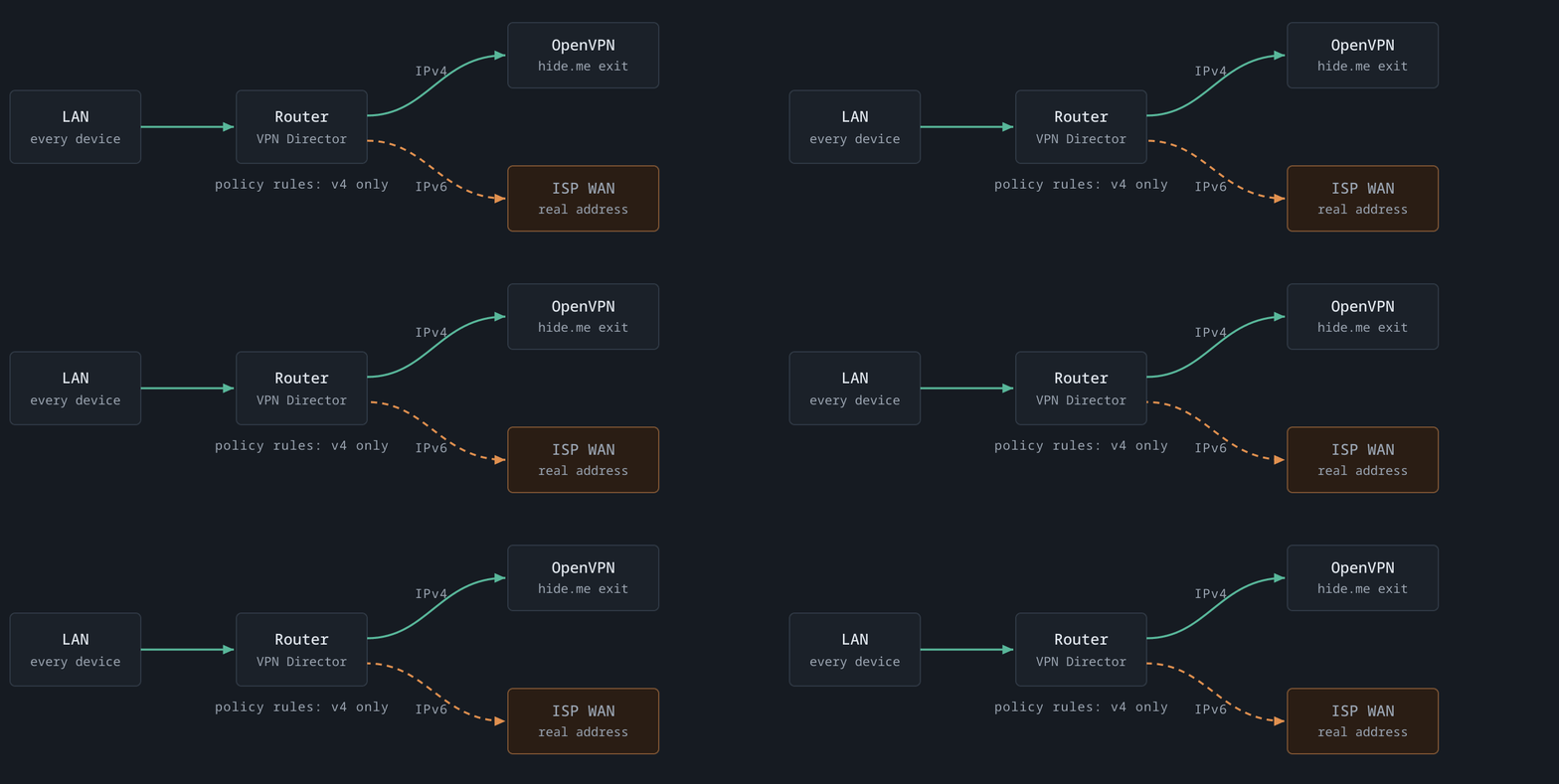
hide.me was providing IPv6 to the tunnel the whole time; the OpenVPN interface carried a perfectly good v6 address. The problem was upstream of that, in the firmware. Asuswrt-Merlin’s VPN Director implements policy routing for IPv4 only.
You can see it in one command each. Seventeen rules configured in the UI, eleven of them enabled, and here’s what the kernel actually got:
# IPv4 — eleven policy rules, exactly as configured
ip rule show
  10410:  from xxx.xxx.xx.xx  lookup ovpnc2
  10411:  from xxx.xxx.xx.xx  lookup ovpnc2
  … nine more …

# IPv6 — the stock table, and nothing else
ip -6 rule show
  0:      from all lookup local
  32766:  from all lookup main
  ^ no rule sends anything into the tunnel
Selective routing and IPv6 are mutually exclusive on this firmware. IPv4 was correctly tunnelled because of the policy rules; IPv6 escaped for exactly the same reason. And it’s not a setting I’d missed: the rules live in a file whose format is enabled>description>local_IP>remote_IP>interface, where both address fields are IPv4-or-CIDR only. There is no rule you can write there that captures an IPv6 address. The feature isn’t disabled. It doesn’t exist.
I considered patching the firmware and rejected it inside five minutes: C changes to the routing engine and the web UI, rebuilt against the vendor toolchain, redone on every release, no over-the-air update, and a brick risk on the box the entire house depends on.
Moving IPv6 to WireGuard
The way out was sitting in the router already. Alongside the OpenVPN client, the firmware supports WireGuard clients, and hide.me hands out WireGuard configs. So: keep OpenVPN carrying IPv4 with its per-device rules, and add a WireGuard client whose only job is to carry IPv6 for the whole LAN.

There was one trap though – something that would have taken the whole house offline (and resulting me me getting screamed at). There was an old, enabled, whole-subnet policy rule pointing my entire LAN at that WireGuard client. It had been sitting inert for months purely because the client was switched off. The client’s allowed-IPs are ::/0 and nothing else — IPv6 only, no IPv4 route at all. Enabling the client would have activated that rule at the same instant and black-holed IPv4 for every device in the house. I disabled the rule first, then enabled the client.
And then it still didn’t work, which is where it got interesting.
The part the firmware does build
“VPN Director is IPv4-only” turned out to be one level too shallow. Merlin actually builds almost everything needed for IPv6 through WireGuard, and does it correctly:
- it brings the WireGuard interface up and gives it an address;
- it installs the NAT66 masquerade;
- it builds a fully populated routing table for that client — the v6 default split into halves, so it overrides the default route without deleting it.
What it never builds is the one line that selects traffic into that table, because the thing that would write that line is the rule engine, and the rule engine is IPv4-only.
The diagnostic that matters: check
ip -6 route show table wgc1, not the main-table v6 default route. The main-table default stays pointed at the ISP permanently, by design, and it is not a failure signal. I wasted a real amount of time treating it as one.
So the fix is four rules, added by hand. Three of them route; the fourth is the one I care about most.
| Priority | What it does |
|---|---|
9998 | Traffic to my own LAN prefix uses the main table — so devices can still reach each other without a round trip through Europe. |
9999 | Traffic to the WireGuard server subnet — the one I use to get back into the house from outside — also stays local. |
10000 | Everything else from the LAN prefix goes into the tunnel’s table. This is the rule that closes the leak. |
10001 | Blackhole. If the tunnel drops, its table empties, rule 10000 falls through to the main table, and the leak silently returns. This rule catches that fall-through and drops the traffic instead. It fails closed. |
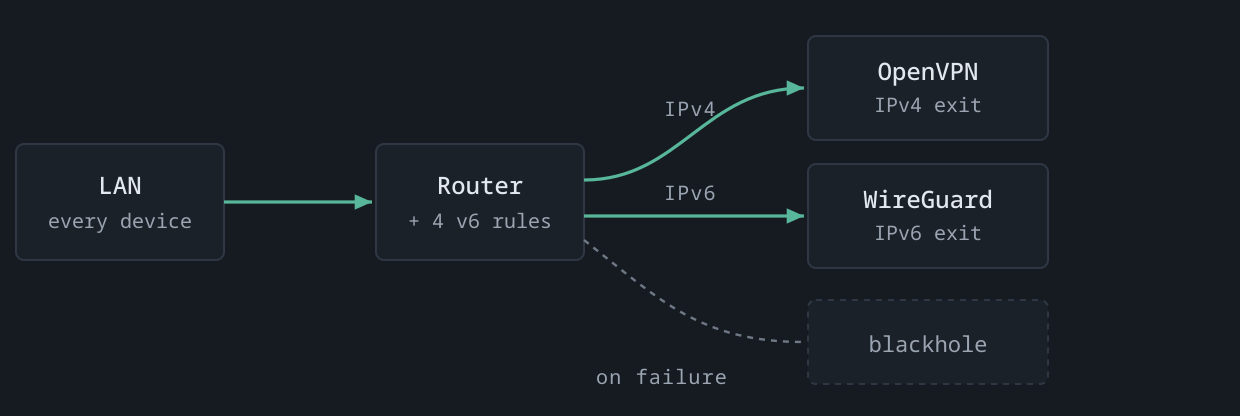
I added the four rules, tested, and got a clean result: IPv6 now exiting at the VPN provider, IPv4 unchanged, devices still able to talk to each other. Wrote it up. Done.
Then the router rebooted
Rules added with ip -6 rule add live in memory. They do not survive a restart. I knew that, which is why I’d put the commands in the firmware’s WireGuard start hook — a script the router runs whenever that client comes up, including at boot. I tested the hook by cycling the client. It fired. Rules appeared.
The router restarted a few days later. I checked. Nothing. Stock rules only — not even the blackhole, so there wasn’t even fail-closed protection during the gap. IPv6 was back on the real ISP connection, and IPv4 was still perfectly fine, which is exactly the combination that doesn’t announce itself.
The hook wasn’t broken. It ran. The system log is unambiguous about why it did nothing:
12:16:48  wgclient-start invoked with args: [1]
12:16:48  no ipv6_prefix delegated, skipping policy rules
12:17:24  dhcp6_client: bound … prefix xxxx:xxxx:xxxx:xxxx::/64
          ↑ the prefix arrives 36s after the hook has already given up
The rules have to be written against my current IPv6 prefix, and at boot the WireGuard client comes up about half a minute before the ISP finishes delegating that prefix. The script read an empty value, correctly declined to write nonsense, exited — and nothing ever ran it again.
Every test I’d run before this started the client by hand, on a router that had been up for hours and already had its prefix. The one trigger that matters in production was the one I had never exercised.
And checking the logs surfaced a second problem I hadn’t even been looking for: the prefix isn’t stable. It changed across that reboot. Which means that even a hook that won the race would eventually go stale — my ISP hands out a different prefix, the rule keeps matching the old one, it matches nothing, traffic falls through, and the leak reopens quietly on some random Tuesday with no reboot involved at all.
A one-shot installer was never going to be right, race or no race. The trigger was wrong, not the timing.
The fix: stop installing, start reconciling
So I rewrote it (with the help of an AI). Instead of a script that installs rules when an event fires, there’s now a script that describes what the rules should be — as a function of whatever the current prefix is — compares that to what’s actually in the kernel, and fixes the difference. It’s idempotent, it’s silent when everything is already correct, and it can therefore be run constantly.
Four things run it, fastest first:
| Trigger | What it covers |
|---|---|
| WireGuard start hook | Cycling the client, or toggling it in the web UI. |
| A bounded background wait | The boot race. If the prefix isn’t there yet, poll for it and reconcile the moment it arrives — seconds after delegation, not a minute. |
| Cron, every minute | Prefix changes, manual damage, and a client that never came up at all. |
| A boot script | Re-adds the cron entry, which lives in a temp filesystem and doesn’t survive a restart either. |
Two of its behaviours look like bugs and are not, so they’re commented heavily in the script itself:
An empty prefix does not trigger a teardown. The obvious reading — no prefix, so remove the rules — would mean that a momentary blank reading during a connection renegotiation drops the blackhole and opens the leak. With no prefix delegated there’s no global IPv6 to leak anyway, so holding the existing rules is strictly safer. Only a deliberate shutdown removes them.
A tunnel that’s down still fails closed. The routing table is referenced by name, so the rule installs whether or not the interface exists; an empty table just falls through to the blackhole. This is precisely why the boot script matters — a boot where the tunnel never came up would otherwise have no tunnel, no cron, and no blackhole.
What I actually verified
Given that I’d already fooled myself twice with tests that returned the right answer without the thing under test ever executing, I was strict about this. Each of these was confirmed to have really run:
- Install from cold — rules present with the correct prefix, and IPv6 now exiting at the VPN provider while IPv4 stayed put.
- Idempotency — repeated runs change nothing and log nothing.
- Prefix rotation — I set the rule to a fake stale prefix by hand (leaving the blackhole in place, so the test failed closed rather than leaking) and watched the reconciler re-key it.
- The real hook path — stopping and starting the client through the firmware’s own service command, not by calling the script myself with the argument I hoped it would get.
- The cron backstop — deleted a rule by hand and left it. It came back 45 seconds later, with no hook firing. This is the one that proves cron is running the script, rather than proving the file exists.
The 5am check
One thing was still unverified, and it was the important one: an actual boot. The waiter and the boot script had been tested by invocation, not by a restart — the same category of “tested” that failed me last time.
The router restarts on a schedule at 5am, once a week — a habit I keep for unrelated reasons and which has now become the most useful test rig in the house. This morning it came up, the WireGuard client started too early exactly as predicted, and the system log answers the question without me having to interpret anything:
05:03:39  wgclient-start invoked with args: [1]
05:04:00  no ipv6_prefix delegated yet, holding off (will retry)
05:04:48  prefix appeared after 68s, reconciling
05:04:48  IPv6 policy rules installed: xxxx:xxxx:xxxx:xxxx::/64 -> table wgc1
Four rules, keyed to today’s prefix, installed 69 seconds after the client came up and without anybody watching. The cron entry was back where the boot script puts it. Asking both stacks separately: IPv6 exiting at the VPN provider, IPv4 unchanged at the same exit it has always used.
And the prefix rotated again — a third distinct value across three boots. The re-key path I’d tested by hand with a fake stale prefix turned out to be the ordinary case, not the edge case. If I had shipped the version that won the race but wrote the prefix once, it would have been correct this morning and wrong by the next reconnection.
| When | What actually happened |
|---|---|
05:03 | Scheduled restart. Everything gone — rules, cron entry, the lot. |
+ 39s | WireGuard client starts. No prefix yet. The hook backgrounds the waiter instead of giving up — this is the exact line where the old version quit. |
+ 68s | The ISP delegates a prefix, and a different one again. The waiter wakes and reconciles. |
+ 69s | Four rules installed, keyed to today’s prefix. Boot script has re-added the cron entry; the watchdog takes over. |
| morning | Both stacks asked by name. IPv6 at the VPN provider, IPv4 unchanged. No intervention at any point. |
What I hadn’t priced in is the gap. For those first 69 seconds there are no rules at all — blackhole included. In practice there is nothing to leak yet: no prefix has been delegated, so no device in the house has a global IPv6 address to leak from. But “nothing to leak yet” is a weaker guarantee than “fails closed”, and it holds only as long as those two events stay in that order. The blackhole doesn’t need to know the prefix. It can go in unconditionally the moment the client starts, before the waiter begins polling, and that’s the next change.
Three things I’d take away from this
Test both stacks, separately, always. A single “what’s my IP” check answers for whichever stack won the race, and it will confidently show you the tunnelled one while the other walks out the front door. Ask each one by name.
“It works” and “it survives” are different claims. I had genuine evidence for the first and had quietly assumed the second. The gap between them was a reboot, and the only honest way to close it was to actually reboot the thing and read the log afterwards — not to reason about whether it should have worked.
Anything that installs state from an event will eventually be wrong. The event fires at the wrong moment, or the state it captured goes stale, or something else clears it. Describing the state you want and continuously converging on it is more code up front and much less to think about afterwards.
The WebRTC prefs, incidentally, took about four minutes.
Router: ASUS RT-BE88U on Asuswrt-Merlin 3006.102.8_4. VPN: hide.me, local in-country endpoint, OpenVPN for IPv4 and WireGuard for IPv6. Every address, prefix and internal subnet in this post is masked.