A 2016 Echo Dot, a bootloader exploit, and a voice assistant that never leaves the house.
Home Assistant has had a local voice pipeline for a while. Speech-to-text, intent matching and text-to-speech can all run on hardware I own. What I didn’t have was anything to talk into. A satellite needs a decent microphone array, a speaker, and a box that looks like it belongs on a shelf.
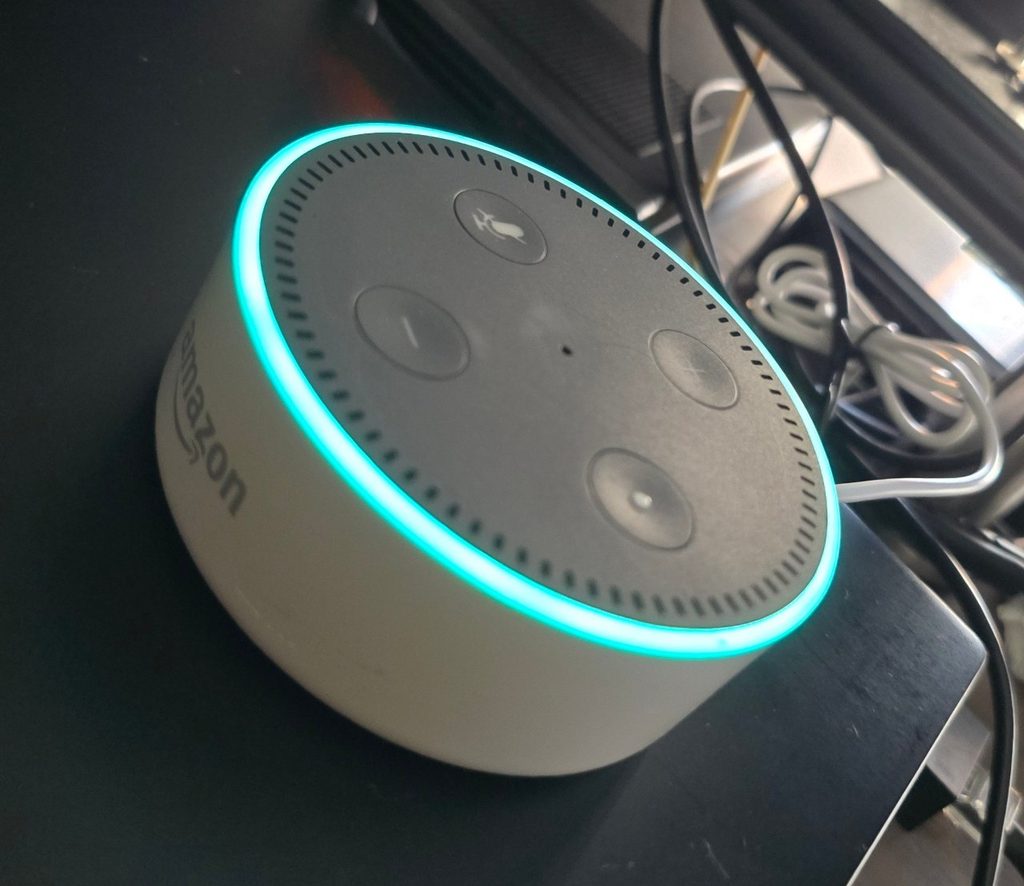
Amazon sold millions of those boxes. The problem is the software on them.
EchoMuse replaces it. It runs on the Echo Dot 2nd generation (2016, model RS03QR, codename “biscuit”) and nothing else yet. It presents the Dot to Home Assistant as an ESPHome voice satellite. HA’s Assist pipeline does the listening and thinking; a controller running as an HA add-on brokers between the two. Wake-word detection happens on the Dot itself, so nothing leaves it until it hears its name.
Getting there took four steps on one evening: unlock the bootloader, flash known firmware, set up the HA side, and run the EchoMuse install wizard.
Step 1: Unlocking a device that doesn’t want to be unlocked
The unlock is amonet-biscuit, by R0rt1z2, documented in the XDA thread. It exploits the MediaTek bootrom, replaces the bootloader chain with one that will boot unsigned images, and installs TWRP as a recovery. I used v2.0.0 from a Linux desktop with android-tools, python-pyserial and the Android udev rules installed, and my user added to the uucp group for serial access.
The Dot has no screen, so you pick a boot mode by holding a button while you plug in the USB cable:
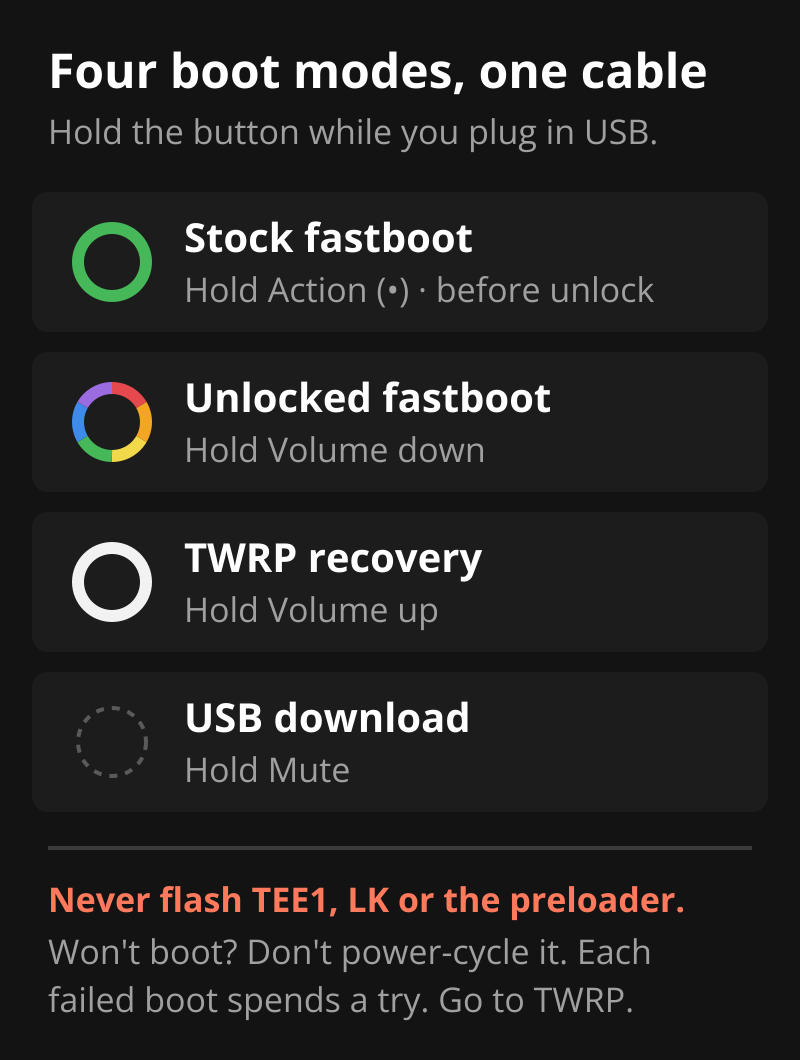
Before touching anything, fastboot getvar all in stock fastboot confirmed product: BISCUIT and a locked bootloader. Then the exploit itself:
bash fastbrick.shIt asks for confirmation. Type YES in capitals. Lowercase aborts. About 15 seconds later the Dot was booting TWRP.
The cable problem
Cables were the first wall. Two of my micro-USB cables were charge-only. The ring lit up, which looks like progress, and the kernel logged nothing at all. A data cable shows 0e8d:2000 MT65xx Preloader in dmesg for about a second at every power-on. If you don’t see that line, change the cable before you change anything else.
Plug the Dot straight into a motherboard port, not a hub. There is a 10-second grace period in the exploit, and an interruption after it can brick the Dot.
The rule that keeps it alive
Never flash TEE1, LK or the preloader. And if the Dot won’t boot, don’t keep power-cycling it. The preloader counts failed boot attempts per slot. Run both slots out and recovery means opening the case and shorting a test point on the board. Hold volume up and go to TWRP instead.
Step 2: Known firmware in both slots
The Dot has A/B slots, like a modern phone. I wanted both holding the same clean Fire OS build so a slot switch could never land on something unexpected. The build was Fire OS 6574.1, NS65741/8142 (build 13222530692). I checked the file’s MD5 against the record on FTVDB and the ETag on Amazon’s own download server before using it.
In TWRP:
twrp wipe cache
twrp wipe data
adb push <firmware>.bin /sdcard/update.zip
twrp install /sdcard/update.zip
The XDA thread then says to flip the active slot with bcbtool set_active and install again. That step is wrong here. twrp install already writes the inactive slot and then makes it active. Flip it back yourself and the second install re-flashes the same slot you just wrote.
What worked:
- Install.
adb reboot recovery.- Check
getprop ro.boot.slot_suffixto see which slot you’re on now. - Install again. It goes to the other slot.
The boot control block afterwards showed slot A active with prio=15 success=1, and slot B holding the same image.
I skipped the optional root package. The EchoMuse wizard works from inside TWRP and doesn’t need it.
Step 3: The Home Assistant side
This is where I found out my voice setup had never been a voice setup. The default Assist pipeline had no speech-to-text and no text-to-speech configured at all. It had only ever handled typed commands.
So, in order:
- Resized the HA VM from 2 cores / 4 GB to 4 cores / 6 GB. Whisper is not free.
- Installed Whisper (the faster-whisper add-on, English, model on
auto) and Piper (voiceen_US-lessac-medium). Both register through the Wyoming integration. - Rebuilt the pipeline: Whisper → Home Assistant’s built-in agent → Piper. A typed “what time is it” came back as “8:41 PM” plus a 17 KB audio file. Good sign.
- Added the EchoMuse add-on repository (one-click link) and installed the controller, version 2.25.0.
Two gotchas here, both quiet.
The sidebar panel was missing. I installed the add-on over the Supervisor API, not the UI. The UI sets “Show in sidebar” for you; the API leaves ingress_panel: false. One options call fixed it.
The controller advertised itself on the wrong network. With server_ip left empty, it picked the HA VM’s address on my main LAN. The Dot was going on a separate VLAN. The add-on starts with HA, so options you set later need a restart. The line to check in the add-on log is mDNS advertising … → <ip>. If that IP isn’t one the Dot can reach, nothing else will work.
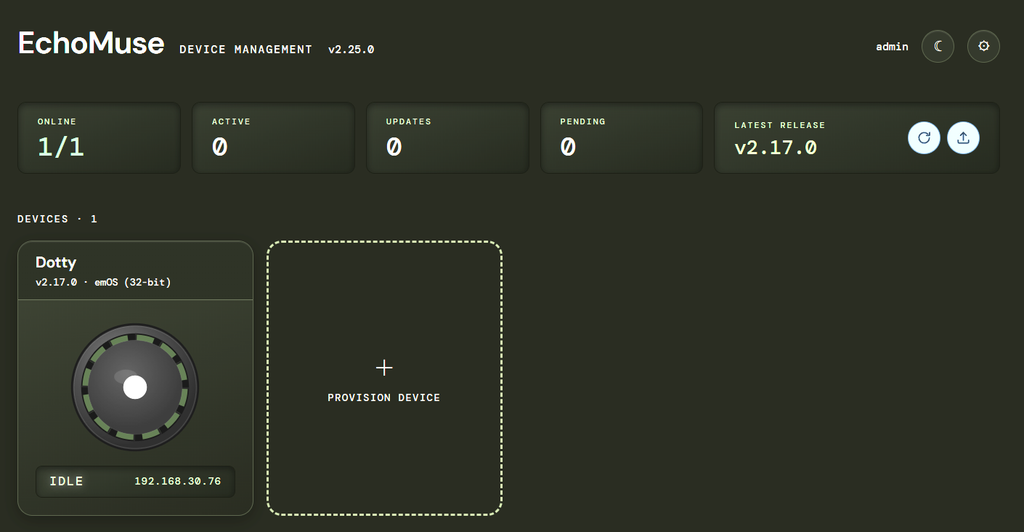
On Wi-Fi: the Dot went on a 2.4 GHz, WPA2-only SSID on its own VLAN. My main SSID runs WPA2/WPA3 mixed mode. I kept the Dot off it because of an open EchoMuse issue about the Dot failing to join Wi-Fi under emOS.
Step 4: The wizard that stopped at step 8
EchoMuse’s install wizard runs in the browser from the add-on’s panel. It saved a copy of the Dot’s stock boot image first. That copy is the undo button, and it now lives in my backups. Then it built an emOS image from the Dot’s own kernel and flashed it.
Then it sat at step 8, “Reboot and watch”, with the Dot stuck at boot stage 11.
Step 8 sends Wi-Fi credentials to the Dot over WebSerial, through the browser, to a USB serial console (1949:2007, /dev/ttyACM0). That device is owned by the uucp group. I’d added myself to uucp earlier in the evening, but the browser had been running since before that, so it still had the old group list and couldn’t open the port. The wizard doesn’t say that. It just waits.
Rather than restart the browser and hope, I added a udev rule giving the logged-in user access to both USB IDs the process uses:
# /etc/udev/rules.d/70-echomuse-serial.rules
SUBSYSTEMS=="usb", ATTRS{idVendor}=="1949", ATTRS{idProduct}=="2007", TAG+="uaccess"
SUBSYSTEMS=="usb", ATTRS{idVendor}=="0e8d", ATTRS{idProduct}=="2000", TAG+="uaccess"
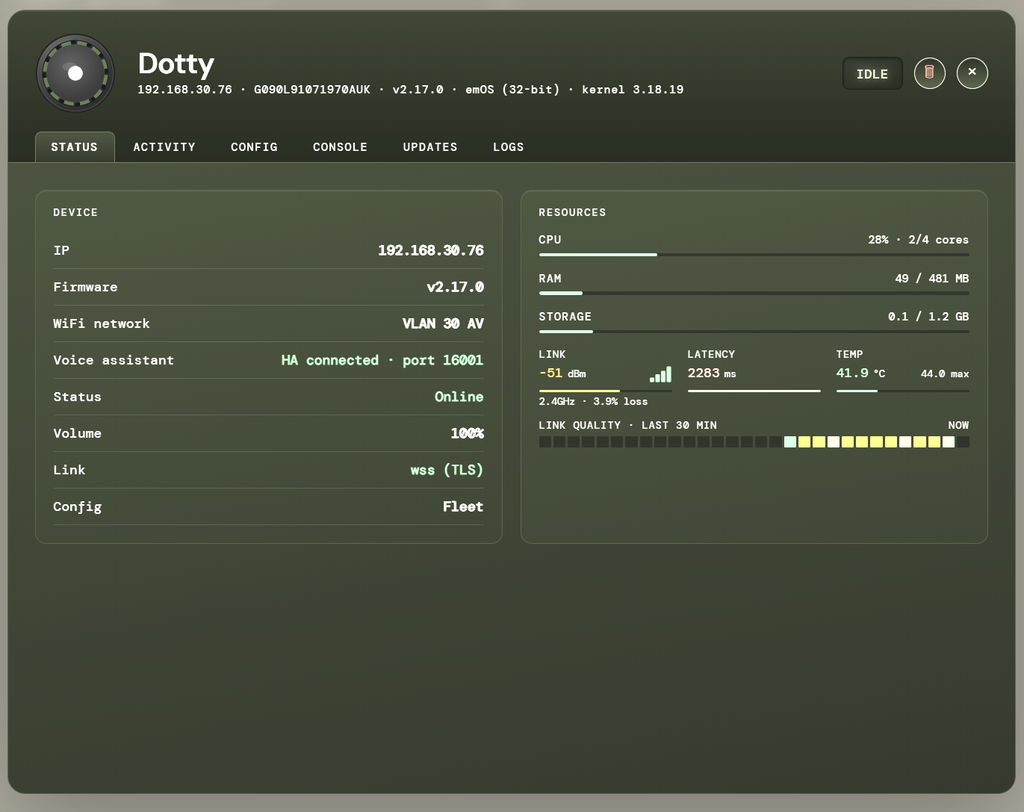
Reload the rules, click Reconnect in the wizard, and the Dot joined Wi-Fi, reached the controller and appeared as pending approval. I named it Dotty and approved it.
Home Assistant discovered it over zeroconf as an ESPHome device, with an Assist satellite entity, a media player, an event entity for the action button, and wake-word selects. The wake word is “Hey Jarvis”. The quickstart still says “Hey Rhasspy”, which is out of date. Listening was set to on-device automatically: nothing streams until the wake word fires.
First words
The controller logs every turn. The first three:
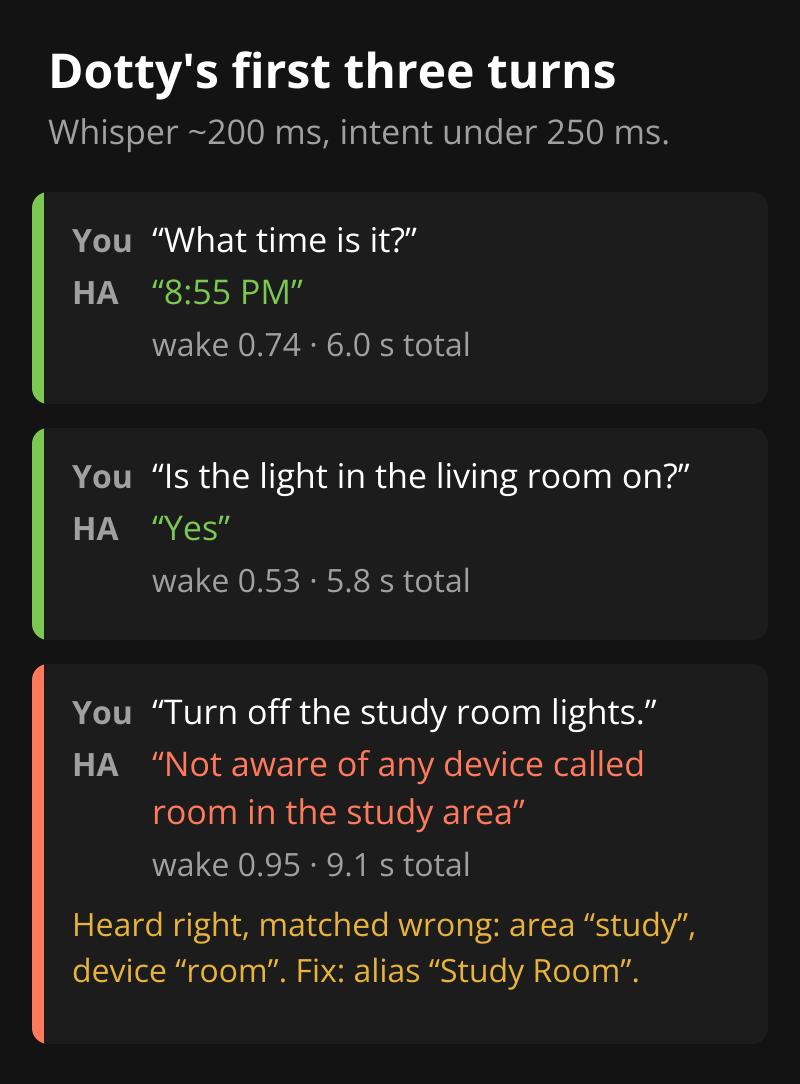
Whisper finished about 200 ms after I stopped speaking. HA’s intent matching took under 250 ms. Most of the rest is the round trip and speaking the reply.
The third one is a good failure, because it isn’t a voice problem. Whisper heard me perfectly. HA’s built-in matcher split “study room” into an area called study and a device called room. The fix was one alias, Study Room, on the study area. The conversation debug tool now resolves the same sentence to turning off eight lights.
If a voice command misfires, open the pipeline’s Debug view under Settings → Voice assistants before blaming the microphone. It shows exactly what was heard and what was matched.
What’s still open
- One dropped connection. A few minutes after going live, the controller closed the Dot’s link on a keepalive timeout. It reconnected by itself 16 seconds later. The Dot sits on a mesh node, not the main router, so roaming is my first suspect. If it recurs, I’ll pin it to one access point.
- Updates. Firmware updates come over Wi-Fi. emOS updates currently mean re-running the wizard (tracked here).
- The undo. The saved stock boot image is the only fast way back. Keep it somewhere that gets backed up.
A 2016 speaker answering questions with nothing leaving the house is a good evening’s work. The parts that cost time were two charge-only cables, one wrong step in a forum guide and one stale group membership. None of them showed an error.
Resources
EchoMuse
- EchoMuse on GitHub (MIT)
- Quickstart
- Rooting guide
- Configuration
- Add the add-on repository to Home Assistant
Unlock and flash
- amonet-biscuit: unlock, root, TWRP and unbrick for the Echo Dot 2nd gen (R0rt1z2, XDA). I used v2.0.0; it left TWRP 3.7.0 as the recovery.
- FTVDB firmware database, to check the Fire OS build and checksum. I used
NS65741/8142, MD5ead2ea9a9ca2fa1c708381a07c605356.
Home Assistant
- Voice control and Assist
- Wyoming integration (Whisper and Piper)