A year ago, running out of disk space was a shopping problem. You waited for a sale, bought a bigger drive, and moved on.
That’s over for now. AI data centres are buying up the world’s memory and flash, and it’s spread to hard drives too. RAM, SSDs and hard drives all cost two to five times what they did twelve months ago, depending on the part. I already skipped buying a second offsite drive in my backup post because a 16 TB disk had become absurd.
So I’m working on the assumption that I won’t buy storage for three years unless something forces me to. Hopefully prices settle by then. That only works if what I already own can last that long, and if I know which drive will fail first.
I didn’t know. So I read every one of them.
38 drives, two days
Every machine in the house got the same treatment: a short self-test, then a full smartctl -x read. That covered two Synology NAS units, the Unraid cold box, four Proxmox hosts, two desktops, a laptop and the Mac mini. It took five operating systems and four different ways of getting root. On the Mac, reading the drive at all first meant quitting a menu-bar monitor that was holding the SMART interface open.
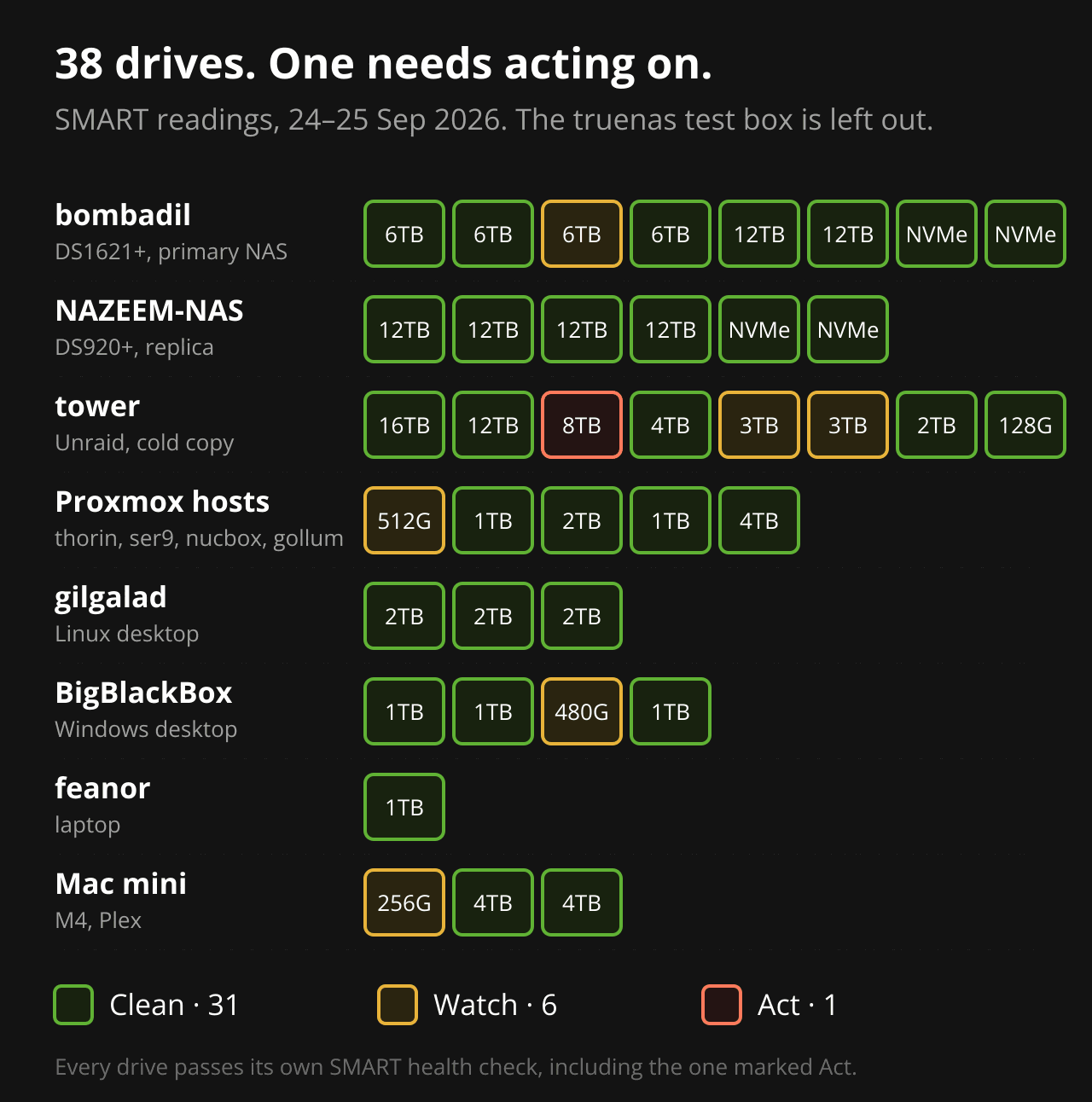
The headline number is encouraging: 31 clean, 6 to watch, 1 to act on. No drive in the lab reports a failing health status, and none has a single media error on an SSD.
The headline number is also nearly useless on its own. A drive’s overall health check is a single pass/fail flag, and it stays at “passed” until the drive is almost gone. Everything worth knowing was in the counters underneath.
The one to act on
The 8 TB Seagate Archive in the cold box. Its media counters are clean: no reallocated sectors, nothing pending. But:
- At some point it ran at 65 °C, ten degrees over its limit. The drive still records that as a past failure.
- 118 high-fly writes. That’s the heads flying too high while writing, usually from heat or vibration. Each one risks a weakly written sector.
- 43 command timeouts, 13 of them over seven and a half seconds.
- 2,177 emergency head parks from unclean power loss, against 65 on its neighbour.
It’s also an SMR archive drive sitting in a parity array, a job it was never designed for, and it’s never had an extended self-test. It was an old external drive I shucked just because I needed the extra space, and I had another 16TB drive replace it as the in-office cold storage. The cold box runs single parity, so while one disk is failed or rebuilding, the array has no protection left.
That makes it the first data disk I’d replace, and the first thing I’m doing costs nothing: a 15-hour surface test, then a parity check. The result decides whether it needs a replacement now or can wait.
The six to watch
- bombadil’s IronWolf 6 TB. 32 reallocated sectors and 368 logged errors. All the errors date from a single event about 18 months ago, and every monthly extended test since has passed. I’m not doing anything yet. If either count moves, I replace it.
- Two 3 TB WD Greens in the cold box. These are the oldest drives I own, at about 50,000 hours each. Each has done around 320,000 head-load cycles, past the 300,000 they’re rated for. Their serials are 85 apart, so they’re from the same batch and may well fail together.
- thorin’s 512 GB Intel 660p. It’s QLC, runs warmest of any host drive at 53 °C idle, and 75% of its power cycles were unclean. It was a 2nd hand drive I picked up with the M90q, and I may need to rotate it out sooner rather than later.
- BigBlackBox’s Crucial M500. The flash is fine, with 1% wear. The problem is 12,803 resets between accepting a command and completing it, which tracks the resume hangs I’ve been fighting.
- The Mac mini’s internal SSD. More on that one below.
What the health check doesn’t tell you
Three of the most useful findings came from counters that no health status reports.
Sleep was counting as a power cut. My Linux desktop’s drives had logged 380 unsafe shutdowns against 806 power cycles. That’s the drive’s count of times its power disappeared before it was told to shut down. I suspended the machine once and re-read the counters. All three drives went up by exactly one power cycle and one unsafe shutdown. Every suspend has been counting as a hard power cut on every drive, for eight months. Nothing is damaged, but it’s a free fix, and I’d never have found it by looking at health status.
The Mac mini wrote 47 TB in its first month. Its 256 GB SSD had already used 6% of its rated life. I checked the unit maths against the operating system’s own byte counter so I wasn’t misreading the scale. It’s real: roughly 85 GB an hour for three weeks, and then it stopped. If whatever caused it comes back (Ollama is the likely culprit), that drive reaches its rated life in about a year. It isn’t a purchase problem (yet). It’s something to monitor, and a reason never to let that burst come back unnoticed.
The Mac’s 8 TB external array is a stripe. It’s two 4 TB drives in RAID 0, with zero redundancy: either drive dies and both are gone. It’s also empty. That makes it the cheapest redundancy decision in this whole post. Rebuilt as a mirror, it’s 4 TB that survives a drive failure, and it costs nothing but a reformat.
Age is the real deadline
Health tells you what’s failing. Age tells you what’s going to.
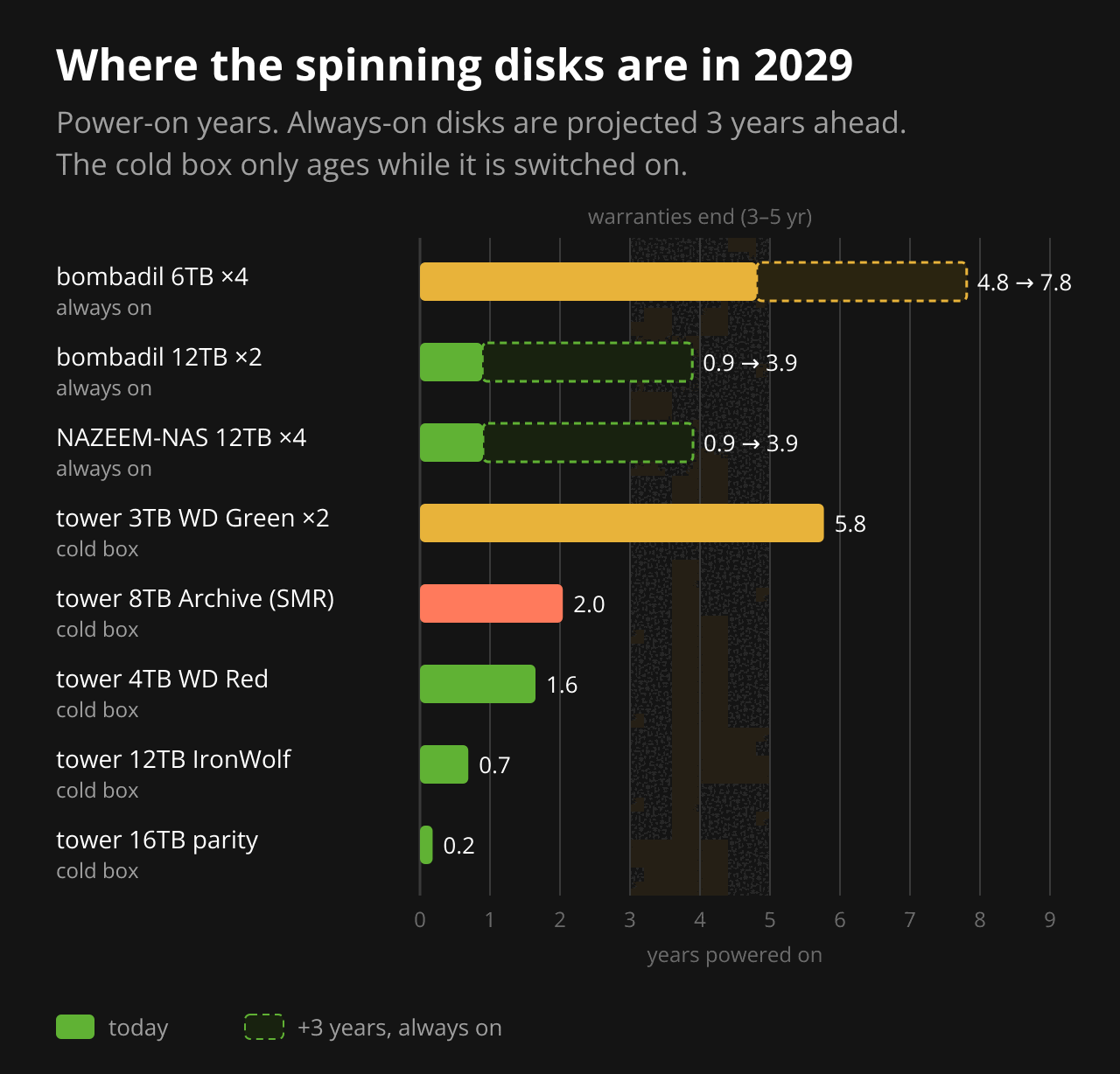
The two NAS units behave very differently. NAZEEM-NAS and the two newer 12 TB drives in bombadil are under a year old. In three years they’ll still be inside a typical five-year warranty.
bombadil’s original four 6 TB drives are 4.8 years in, running non-stop, and from one purchase when I set it up in 2021. In 2029 they’ll be at 7.8 years. Same age, same workload and probably the same batch means they’re likely to fail close together. The failure that actually hurts isn’t the first drive going. It’s the second one going during the rebuild.
The cold box is different, because it only ages while it’s switched on. Its old drives are old because of a previous life, not because the box runs all the time.
Redundancy, not replacement
The normal answer to ageing drives is to replace them on a schedule. At current prices that means paying double or more for drives that still work, so I’m not doing it.
The plan for the next three years is narrower:
- Replace on evidence, not on age. A drive gets replaced when its counters move, not when it has a birthday.
- Hold one spare that fits everywhere. A sealed 16 TB NAS drive can stand in for any of the 16 hard drives across both NAS units and the cold box. Sixteen is also the ceiling, because in Unraid no data disk can be bigger than parity. A 12 TB drive would be cheaper and covers everything except the cold box’s parity disk.
- Do the free things first. Most of the risk in this audit costs nothing to reduce.
The free list:
- Run the extended test and a parity check on the Archive drive.
- Rebuild the Mac’s stripe as a mirror before anything lands on it.
- Fix the suspend path on the Linux desktop so sleep stops counting as a power cut.
- Use the test box as a parts donor. My TrueNAS test machine has two clean 4 TB drives in a pool I don’t need. Either one can replace a 3 TB WD Green in the cold box, and it’s bigger. The cheapest drive is the one already in a drawer.
The gaps in this audit
Three drives weren’t read: the 16 TB offsite drive at the office, gollum’s removable USB backup SSD, and the USB SSD behind the Proxmox Backup Server that travels with my laptop. They’re the drives I’d reach for when everything else is gone, and they’re the ones I checked least. They’re first on the next round.
The list
If one of these turns up at a sane price, in this order:
- One 16 TB NAS drive, kept sealed as a cold spare. It covers all 16 hard drives across three arrays, and it’s the only buy on this list I’d make before anything fails.
- A replacement for the 8 TB Archive drive, but only if it fails its extended test. If it does, the spare from #1 goes in, and #1 goes back to the top of the list.
- A second 16 TB offsite drive, so the office copy rotates instead of being a single unverified disk. It’s the gap I wrote about in the backup post and still haven’t closed.
- bombadil’s four 6 TB drives, two at a time, starting with the IronWolf. This is the big-ticket item, and it’s the one most likely to be forced on me before 2029.
- A 1 TB TLC NVMe for thorin, to replace the warm QLC 660p. It’s small money, but it’s a single-disk host.
- A second parity drive for the cold box. It’s a 16 TB drive for peace of mind, and very much a nice-to-have at today’s prices.
- A cheap SATA SSD to replace BigBlackBox’s M500, or just take the M500 out of the sleep path. It’s a workstation, and nothing irreplaceable lives on it.
Not on the list: the WD Greens (the test box donates), the Mac’s stripe (reformat), the Mac’s internal SSD (watch only), and the Linux desktop’s drives (it’s a config fix).
The point of the exercise wasn’t to find broken drives. There was barely one. It was to make the buying decision before prices or a failure make it for me, and seven items in a known order is a much easier thing to wait out than 38 unknowns.