I did not go to Japan to buy a laptop. I wasn’t even intending to buy the parts for a desktop that was supposed to be a server, which is its own story. But a second-hand ThinkPad X13 sitting on a shelf at ¥45,800 is the kind of thing that follows you home, and at 125.3 yen to the Singapore dollar that worked out to S$366.
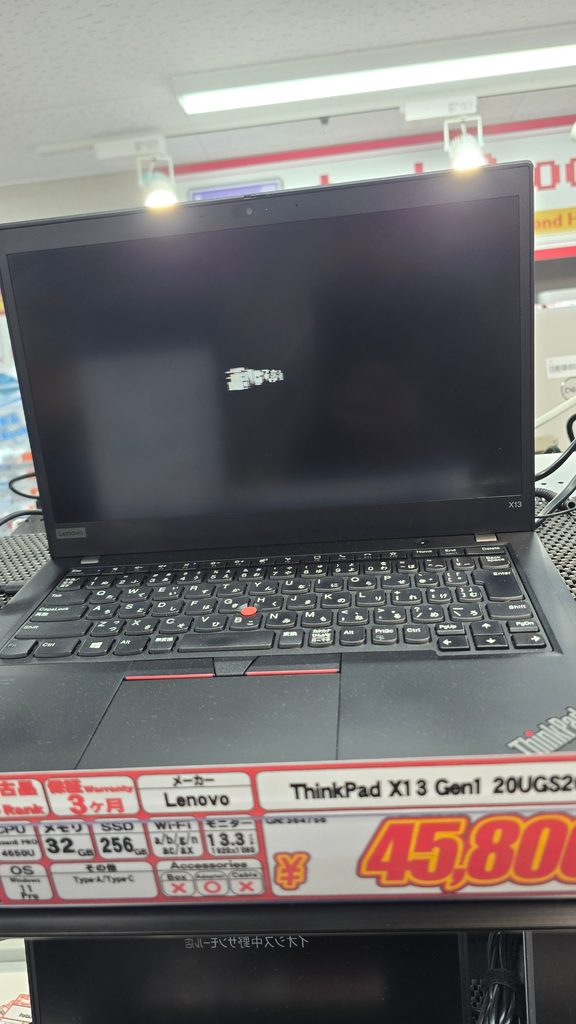
For S$366 I got six cores, 32GB of RAM and a machine that now holds the only copy of my homelab that does not live in my house. That last part is what this post is actually about. The laptop is the cheap bit. The job it does is an interesting outcome of my homelab journey.
What ¥45,800 buys second-hand
- Model: Lenovo ThinkPad X13 Gen 1, machine type 20UGS2Q500
- CPU: AMD Ryzen 5 PRO 4650U, 6 cores / 12 threads, up to 4.00 GHz
- GPU: Radeon Vega, integrated
- RAM: 32GB DDR4-3200, soldered, dual channel
- Display: 13.3 inch, 1920 x 1080, 60 Hz
- Firmware: UEFI 2.70, Lenovo 0.5456, with a TPM 2.0
The RAM is the part worth pausing on, because it is soldered. 32GB is what this machine has and what it will have for the rest of its life. That also means the 32GB came from the factory rather than from a previous owner with a screwdriver, so finding a second-hand X13 specced this way at this price was luck rather than shopping. It is the first spec I check on any used laptop now, for exactly that reason: the SSD and the keyboard turned out to be trivial to change, and the memory can never be changed at all.
One oddity for anyone else poking at one of these. dmidecode reports the memory as two Samsung SODIMM modules, complete with retail part numbers, which is simply untrue. Nothing in this machine is in a slot. The SMBIOS form factor field is not to be trusted on a ThinkPad, and the only reliable way to answer the question is to take the bottom cover off and look:
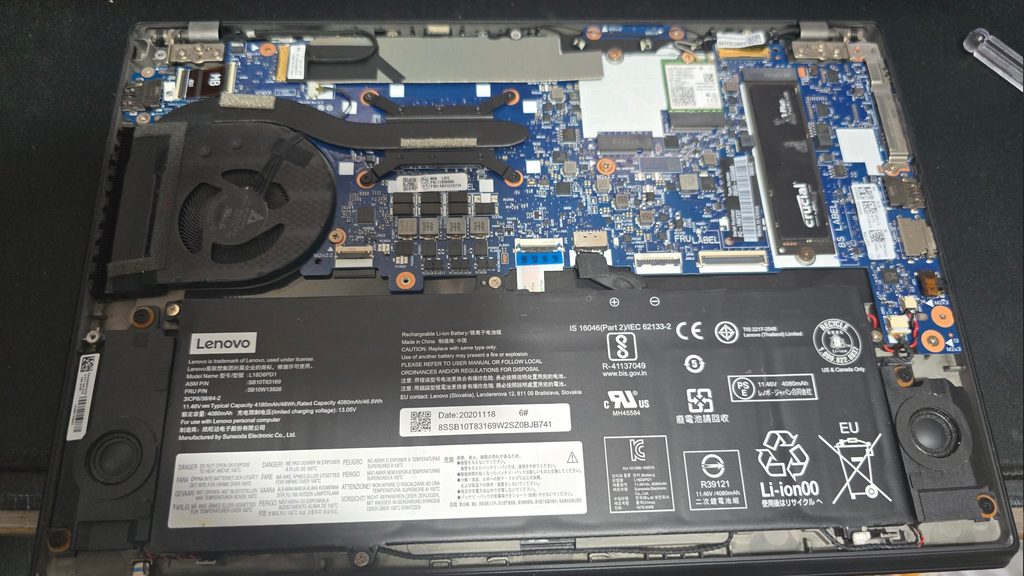
The Ryzen 5 PRO 4650U is a 2020 Renoir chip. Nobody is going to call it fast in 2026. But 6 cores and 12 threads at 15W is a great deal more machine than the job I had in mind needs, and it runs cool and silent doing it.
Two upgrades, both easy, which is the point
The stock drive went straight in a drawer and a 1TB Crucial P3 Plus went in for S$89. Nothing exciting, and deliberately so: it is a cheap QLC drive, and for a machine whose working set is a backup datastore it is exactly enough. It formats out to 929.51 GiB and sits at 20% used.
The keyboard was the other change. A ThinkPad bought in Japan comes with a Japanese JIS keyboard, which has a shorter space bar, a different Enter key and several keys in places my hands do not expect them to be. I swapped it for the International ISO unit for S$30.
It fit with no other parts. No different bezel, no FRU hunting, no firmware complaint, no plastic clips sacrificed to the process. That is the entire argument for buying ThinkPads because on most modern laptops a keyboard swap means heat guns, adhesive and a palm rest assembly that costs more than this whole machine did.
The software still carries a trace of where it came from. My X11 layout is set to us,jp with Alt+Shift to toggle, which is a leftover I have not bothered to remove.
All in: S$366 for the laptop, S$89 for the SSD, S$30 for the keyboard. S$485 for six cores, 32GB of RAM and a terabyte of NVMe, which is roughly what a mid-range phone costs.
CachyOS, again
I put CachyOS on it, same as the desktop. Kernel 7.2.0-1-cachyos, KDE Plasma 6.7.4 on Wayland, fish as the shell, 1,450 packages. I have written about why CachyOS elsewhere and will not repeat it here. What matters for this post is that it is Arch underneath, because that turns out to cause the single most annoying problem in the whole build.
Taking the keys: Secure Boot on my own terms
Most people meet Secure Boot as the thing you switch off in the BIOS so Linux will install. That is a shame, because the underlying mechanism is genuinely useful: the firmware refuses to run any EFI binary that is not signed by a key it trusts. The catch is whose keys those are. Out of the box, they are Microsoft’s.
You do not have to accept that. sbctl lets you generate your own Platform Key, Key Exchange Key and signature database, enrol them into the firmware, and sign your own bootloader and kernels. The firmware then trusts you.
I generated mine in June and enrolled them with Microsoft’s certificates retained:
sudo pacman -S sbctl
sudo sbctl create-keys
sudo sbctl enroll-keys --microsoft
sudo sbctl-batch-sign
sudo sbctl verify
That --microsoft flag is a deliberate choice rather than laziness, and it is worth understanding what it does. Without it, you wipe Microsoft out entirely and the firmware trusts nothing but you. That sounds better than it is. Lenovo ships firmware updates as signed EFI capsules, and plenty of hardware carries option ROMs signed by Microsoft’s third-party certificate. Wipe those keys and you can find yourself unable to apply a BIOS update, or with a dock that stops working, on a machine whose job is to be reliable.
What you end up with is this:
PK:
  Platform Key
KEK:
  Key Exchange Key
  Microsoft Corporation Third Party Marketplace Root
  Microsoft RSA Devices Root CA 2021
DB:
  Database Key
  Microsoft Corporation Third Party Marketplace Root
  Microsoft Root Certificate Authority 2010
  Microsoft RSA Devices Root CA 2021
Microsoft appears in the KEK and the database, but not in the Platform Key. The PK is the root of the whole trust chain and it is mine alone. Microsoft is a tenant here, not the landlord. If I ever decide I want them gone, I can revoke them without asking anyone.
sbctl-batch-sign in that sequence is not part of sbctl. It is a CachyOS addition, shipped in the cachyos-settings package, and it saves a genuinely tedious step: it reads whatever sbctl verify flags as unsigned and signs all of it in one pass. It is also smart about what to leave alone, skipping Microsoft’s and Windows’ own EFI files on the assumption that you enrolled Microsoft’s keys alongside your own and those files are therefore already trusted. If you dual boot, that assumption is doing you a favour.
The other half of making this survive contact with reality is the pacman hook. Arch ships new kernels constantly, and an unsigned kernel means a machine that will not boot. zz-sbctl.hook re-signs everything automatically on every update, so a routine pacman -Syu does not strand you at a firmware error screen. Every EFI binary on the disk verifies:
$ sbctl verify
Verifying file database and EFI images in /boot...
✓ /boot/EFI/BOOT/BOOTX64.EFI is signed
✓ /boot/EFI/systemd/fwupdx64.efi is signed
✓ /boot/EFI/systemd/systemd-bootx64.efi is signed
✓ /boot/vmlinuz-linux-cachyos is signed
✓ /boot/vmlinuz-linux-cachyos-lts is signed
The job it actually does
Here is the problem this laptop exists to solve.
My backups have three tiers. Tier 1 is Proxmox Backup Server running on the NAS, which handles routine restores. Tier 2 is a second PBS instance on another host with its own internal 4TB drive, which covers the NAS failing or a power event taking out the primary. Both of those tiers are excellent. Both of them are also in my house.
Fire, flood and theft do not care how many copies you have if they are all in the same building. That is Tier 3, and until recently my Tier 3 was a USB drive I carried to the office and carried home again to refresh. Which works, right up until the week you do not get round to it.
Feanor is Tier 3 made refreshable in place. It sits at the office with the USB drive attached, and pulls new backup data from home over Tailscale on demand.
Proxmox Backup Server does not run on Arch
This is where the plan met its first wall. Proxmox ships proxmox-backup-server for Debian and nothing else. The AUR has proxmox-backup-client, which sounds close enough but is not: the client writes into a datastore, it cannot act as the target of a sync job. There is no way to make an Arch box a PBS replication target natively.
The options were rsync, or Debian in a container. I went with a container, and the deciding factor was verification. PBS can re-read every chunk in a datastore and prove it is intact. rsync gives you transfer integrity and nothing else, and a backup you cannot verify where it lives is a backup you are trusting on faith. The drive would sit at the office unverified for months at a time.
So: a Debian 13.6 root inside a systemd-nspawn container on the CachyOS host, running the same PBS 4.2.3 as the machine it pulls from. About 353MB for the base system.
The debootstrap bug nobody has written up
Building that Debian root should be one debootstrap command. On CachyOS it fails:
Unknown architecture: x86_64Arch’s debootstrap package carries a patch that works out the host architecture by asking pacman-conf Architecture. On stock Arch that returns exactly one value. CachyOS returns three, because it ships separate repositories optimised for different microarchitecture levels:
$ pacman-conf Architecture
x86_64
x86_64_v2
x86_64_v3
The patch feeds that into a case statement expecting a single string, matches nothing, and bails out with an error message that names an architecture it plainly does support. The obvious fix does not work either: --arch=amd64 sets the target architecture, not HOST_ARCH, so it never touches the branch that is failing.
debootstrap has its own override file, checked before the pacman-conf branch is ever reached:
echo amd64 > /usr/share/debootstrap/archThat file is not owned by any package, so it survives updates. One line, and an hour of my life I would like back.
Three things that will bite you
User namespaces will break PBS. The datastore is owned by uid and gid 34, Debian’s backup user. Enabling PrivateUsers on the container shifts those IDs and PBS loses access to its own chunkstore. PrivateUsers=no looks like a missed hardening opportunity and is in fact load-bearing. Leave it alone.
You cannot create a datastore on a non-empty path. PBS refuses, which is a problem when the drive already holds 250GB of carried-over backup data that you very much do not want to re-transfer. The answer is to hand-write the entry into /etc/proxmox-backup/datastore.cfg using tabs, not spaces, and then reload the daemon. A hand-edited config is invisible until it does.
Set ownership numerically. chown root:backup fails from the CachyOS side because Arch has no backup group. Use chown 0:34.
Pull, never push
The sync runs in one direction only: Feanor reaches home and pulls. Home has no route to Feanor at all. The credential home holds for this is scoped to DatastoreReader on a single datastore, which means a compromised machine at my house can read backup data and can do nothing else. It cannot prune, it cannot delete, and it cannot touch the office copy.
There is also no schedule. Nothing starts at boot, nothing fires nightly. The container is stopped and the drive unmounted except during a window I deliberately open. Ransomware that reaches my homelab finds no automated path to the offsite copy, because there isn’t one.
Refreshing it is four commands: mount the drive, start the container, run the sync job, and afterwards stop the container and unmount. That last step is not optional. ext4 on a USB bridge with dirty write caches is the most realistic way to corrupt this entire arrangement.
The verify flag that actually matters
proxmox-backup-manager verify usb-backup --ignore-verified falseIf you take one thing from this post, take this. A sync carries the source’s verification state along with the data. Run a default verify against a freshly synced datastore and PBS will look at all those inherited “already verified” marks, read almost nothing, and report TASK OK. It is the most reassuring useless result in the whole stack.
--ignore-verified false forces it to re-read every chunk on the drive in front of it. On 249 GiB that takes about 14 minutes. Those 14 minutes are the difference between believing you have an offsite backup and knowing it.
What this does not fix
Three honest gaps, because a backup post that only lists wins is not much use to anyone.
It is online, not airgapped. The previous design, a drive in a drawer, could not be reached over a network at all. This one can, during refresh windows. I have narrowed that as far as the design allows, but a compromised Feanor can still destroy its own datastore. That is a failure mode the drawer did not have, traded for a copy that actually gets refreshed.
One drive is still one drive. While it is at the office it protects against my house burning down. While it is in my bag, it protects against nothing. Two drives alternating is what makes this continuous, and I do not have that yet.
The root filesystem is not encrypted. This is the one that bothers me. Secure Boot is enabled with my own keys, and there is a TPM 2.0 in the machine doing precisely nothing:
  Secure Boot: enabled (user)
 TPM2 Support: yes
 Measured UKI: no
  Measured OS: no
Secure Boot stops the machine running a bootloader I did not sign. It does exactly nothing about somebody removing the SSD. And the whole purpose of this laptop is that it leaves my house carrying a quarter-terabyte of my homelab. Theft is one of the three things Tier 3 exists to protect against, and as built, stealing Feanor hands over every backup on it in the clear.
Signing the boot chain while leaving the data unencrypted is securing the front door of a house with no walls. LUKS with the key sealed to the TPM and a unified kernel image is the fix, and it is the next thing I do to this machine.
Why Feanor
Every machine here gets a Tolkien name. Fëanor was the greatest craftsman the Noldor ever produced. He made the Silmarils, and when everything went wrong he was the one who carried them out into exile.
A S$366 second-hand ThinkPad whose entire job is carrying the copies out of the house seemed close enough.